HTML5 Canvas 時鐘實作:路徑、平移與旋轉
編輯:HTML5詳解
在 HTML5 的 Canvas 應用中,時鐘是很經典的入門範例。它可以同時練習路徑繪圖、座標平移、旋轉變換,以及繪圖狀態的保存與恢復。
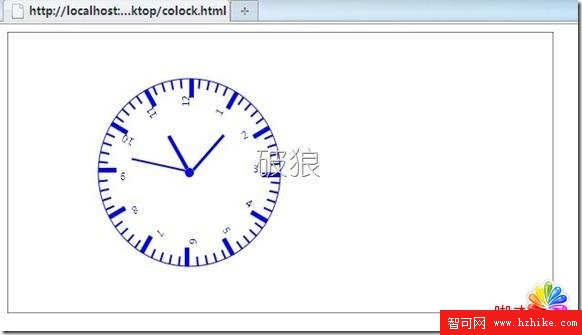
重點 API
beginPath()、closePath():管理路徑。arc()、rect():繪製圓形與矩形。translate()、rotate():進行座標變換。save()、restore():保存與恢復繪圖狀態。
簡化版時鐘程式
<canvas id="myCanvas" width="600" height="300">你的瀏覽器不支援 Canvas</canvas>
<script>
var c = document.getElementById("myCanvas");
var ctx = c.getContext("2d");
var cx = 200, cy = 150, radius = 100;

function drawHand(angle, length, width) {
  ctx.save();
  ctx.rotate(angle);
  ctx.fillRect(0, -width / 2, length, width);
  ctx.restore();
}

function drawClock() {
  ctx.clearRect(0, 0, c.width, c.height);
  ctx.save();
  ctx.translate(cx, cy);

  ctx.beginPath();
  ctx.arc(0, 0, radius, 0, Math.PI * 2);
  ctx.stroke();

  for (var i = 0; i < 60; i++) {
    ctx.save();
    ctx.rotate(i * Math.PI / 30);
    if (i % 5 === 0) {
      ctx.fillRect(radius - 15, -2, 10, 4);
    } else {
      ctx.fillRect(radius - 8, -1, 5, 2);
    }
    ctx.restore();
  }

  var now = new Date();
  var s = now.getSeconds();
  var m = now.getMinutes();
  var h = now.getHours();

  drawHand(s * Math.PI / 30, 70, 2);
  drawHand(m * Math.PI / 30, 90, 3);
  drawHand((h % 12 + m / 60) * Math.PI / 6, 60, 4);

  ctx.restore();
}

setInterval(drawClock, 1000);
drawClock();
</script>
透過這個範例,可以理解 Canvas 如何利用狀態堆疊來處理複雜繪圖,也能實際感受到座標變換在動畫中的重要性。
- 上一篇文章: HTML5 audio 標籤自訂停止播放功能
- 下一篇文章: HTML5 autofocus 屬性:讓表單控制項自動取得焦點