HTML5 音樂播放器 + Ajax 天氣:一個綜合練習 Demo
編輯:關於JavaScript
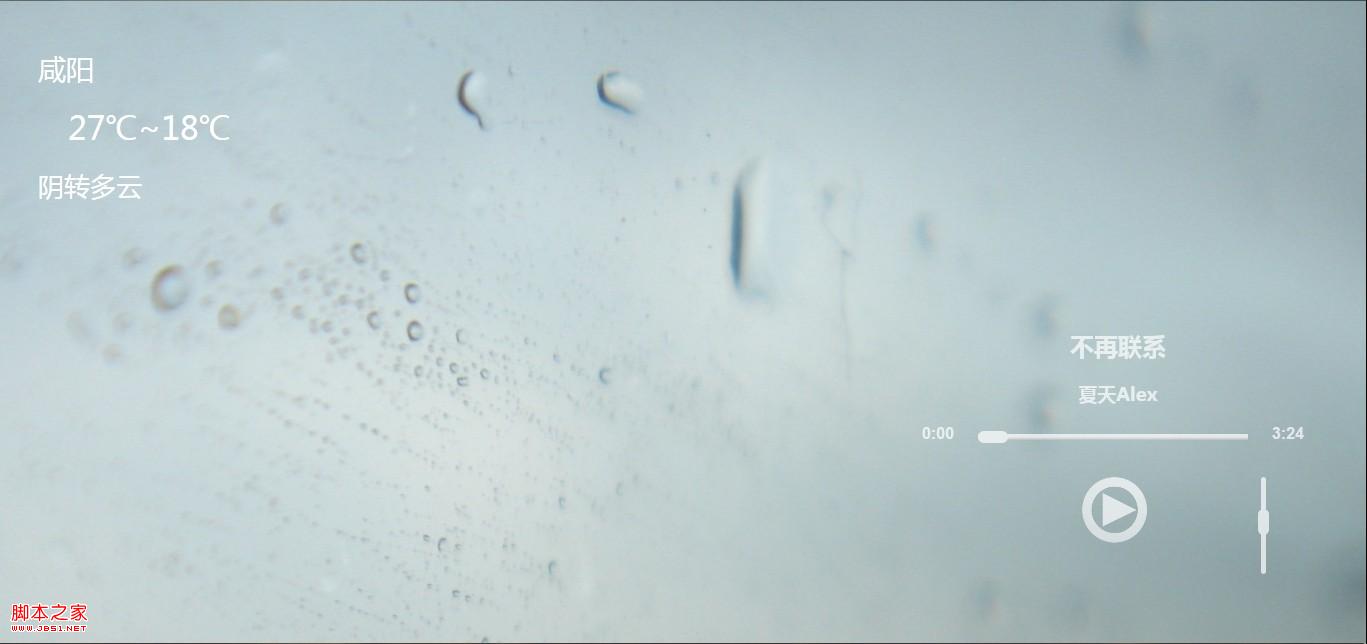
這是一個用來練手的完整小項目:用 HTML5 的 <audio> 做播放,用滑塊控制進度與音量,用 JSON 管理歌單,再用 Ajax 拉取天氣信息顯示在背景上。功能不算多,但把「音頻 API + 拖拽交互 + 異步請求 + 預加載」串在了一起。
功能清單
- 音樂播放/暫停,進度拖動調節,音量調節
- 隨機選曲與下一首預加載
- 背景圖片隨機切換並預加載
- 通過 Ajax 獲取並展示天氣信息
- 歌單用 JSON(可理解為哈希表)組織
關於跨域:天氣接口涉及跨域獲取,實現上有兩個版本——一個是直接跨域請求(當年只有 IE10 支持,其他瀏覽器需改配置),另一個是通過服務端的 weather.php 代理取數據再返回 JSON。實用主義的選擇永遠是後者。
演示地址
https://569375.ichengyun.net/fm/
樣式(節選)
body { margin:0; padding:0; }
.clear { clear:both; }

#weather { position:absolute; left:20px; top:30px;
           font-family:"Microsoft YaHei","SimHei"; }
p#weather-city { color:#FFF; margin:20px; font-size:28px; }
p#weather-temperature { color:#FFF; margin:20px 20px 20px 50px; font-size:32px; }
p#weather-stat { color:#FFF; margin:20px; font-size:26px; }

#music-box {
    position:absolute; right:20px; bottom:30px; padding:30px; text-align:center;
    filter:alpha(opacity=70); opacity:0.7;
}
#music-box:hover { filter:alpha(opacity=100); opacity:1; }

h2#song-title, h3#song-author { font-family:"Microsoft YaHei","SimHei"; color:#fff; }

div#music-process-p {
    float:left; margin:0 20px; width:290px; height:40px;
    background:url(./images/button.gif) 0 -133px repeat-x;
}
span#music-process-slide {
    cursor:pointer; display:block; float:left; width:30px; height:30px;
    background:url(./images/button.png) -30px -230px no-repeat;
}
div#music-ctime, div#music-etime {
    float:left; color:#FFF; font-weight:bold; width:40px; height:30px; font-family:"Arial";
}
div#music-play {
    cursor:pointer; margin:10px auto; width:100px; height:70px;
    background:url(./images/button.png) 0 -12px no-repeat;
}
div#music-next {
    cursor:pointer; margin:15px auto 10px; width:100px; height:40px;
    background:url(./images/button.png) 0 -85px no-repeat;
}
div#music-volume-v {
    float:left; width:50px; height:100px;
    background:url(./images/button.png) 3px -250px no-repeat;
}
span#music-volume-slide {
    cursor:pointer; display:block; float:left; width:40px; height:30px;
    background:url(./images/button.png) 0px -353px no-repeat;
}
初始化與天氣請求
function init() {
    musicBox   = document.getElementById("music-box");
    musicPlay  = document.getElementById('music-play');
    musicNext  = document.getElementById('music-next');
    musicCtime = document.getElementById('music-ctime');
    musicEtime = document.getElementById('music-etime');
    musicSlide = document.getElementById('music-process-slide');
    musicProcess   = document.getElementById('music-process-p');
    musicVolume    = document.getElementById('music-volume-v');
    musicVolumeSlide = document.getElementById('music-volume-slide');

    musicSlide.style.marginLeft = "0px";
    musicProcess.style.width = "270px";

    bdy = document.getElementsByTagName('body')[0];

    // 背景圖預加載:同時準備當前與下一張
    backgroundNumber = Math.ceil(Math.random() * 10);
    backgroundImages[0] = new Image();
    backgroundImages[1] = new Image();
    backgroundImages[0].src = "./rain/" + backgroundNumber + ".jpg";
    backgroundImages[1].src = "./rain/" + (backgroundNumber >= 10 ? 1 : backgroundNumber + 1) + ".jpg";
    bdy.style.background = "url(" + backgroundImages[0].src + ") top";

    // 音頻元素與事件
    music = document.getElementsByTagName('audio')[0];
    music.autobuffer = true;
    setInterval(mProcess, 1000);

    musicProcess.addEventListener('mousedown', mSlideProcessDown);
    musicProcess.addEventListener('mousemove', mSlideProcessMove);
    musicProcess.addEventListener('mouseup',   mSlideProcessUp);
    musicVolume.addEventListener('mousedown',  mSlideVolumeDown);
    musicVolume.addEventListener('mousemove',  mSlideVolumeMove);
    musicVolume.addEventListener('mouseup',    mSlideVolumeUp);

    // Ajax 取天氣
    var wget = new XMLHttpRequest();
    wget.open('GET', './weather.php');       // 服務端代理,避免跨域
    wget.onreadystatechange = function () {
        if (wget.readyState == 4 && wget.status == 200) {
            var weatherInfo = eval("[" + wget.responseText + "]")[0]['weatherinfo'];
            document.getElementById('weather-city').innerHTML = weatherInfo['city'];
            document.getElementById('weather-temperature').innerHTML = weatherInfo['temp1'];
            document.getElementById('weather-stat').innerHTML = weatherInfo['weather1'];
        }
    };
    wget.send();
}
進度顯示與拖動
// 每秒刷新時間與滑塊位置
function mProcess() {
    var ctime = music.currentTime;
    var cur = Math.floor(ctime / 60) + ":" +
              (Math.floor(ctime - 60 * Math.floor(ctime / 60)) < 10
                  ? "0" + Math.floor(ctime - 60 * Math.floor(ctime / 60))
                  : Math.floor(ctime - 60 * Math.floor(ctime / 60)));

    var time2 = music.duration - music.currentTime;
    var et = Math.floor(time2 / 60) + ":" +
             (Math.floor(time2 - 60 * Math.floor(time2 / 60)) < 10
                 ? "0" + Math.floor(time2 - 60 * Math.floor(time2 / 60))
                 : Math.floor(time2 - 60 * Math.floor(time2 / 60)));

    var ra = music.currentTime / music.duration;
    var mpw = parseFloat(musicProcess.style.width);
    musicSlide.style.marginLeft = mpw * ra + "px";

    musicCtime.innerHTML = cur;
    musicEtime.innerHTML = et;

    if (music.ended == true) mRandPlay();
}

function mSlideProcessDown(e) { mouseDown = true; mouseX = e.pageX; }

function mSlideProcessMove(e) {
    if (mouseDown != true) return;
    var mLeft = e.pageX - mouseX;
    var t2 = music.currentTime +
             music.duration * mLeft / parseFloat(musicProcess.style.width);
    t2 = t2 > 0 ? t2 : 0;
    mLeft = parseFloat(musicProcess.style.width) * t2 / music.duration;
    musicSlide.style.marginLeft = (mLeft > 0 && mLeft < 300 ? mLeft : 0) + "px";
}

function mSlideProcessUp(e) {
    if (mouseDown != true) return;
    mouseDown = false;

    var mLeft = e.pageX - mouseX;
    var t2 = music.currentTime +
             music.duration * mLeft / parseFloat(musicProcess.style.width);
    t2 = t2 > 0 ? t2 : 0;
    music.currentTime = t2;      // 松手才真正跳轉

    mouseX = 0;
}
音量控制
function mVolume() {
    music.volume = 0.5;
    musicVolumeSlide.style.marginTop = 70 * (1 - music.volume) + "px";
}

var vT = 0, aT = 0;

function mSlideVolumeDown(e) {
    mouseDown = true;
    mouseY = e.pageY;
    if (musicVolume.style.height == '') musicVolume.style.height = "100px";
    vT = parseFloat(musicVolumeSlide.style.marginTop);
    aT = vT / parseFloat(musicVolume.style.height);
}

function mSlideVolumeMove(e) {
    if (mouseDown != true) return;
    var mTop = aT * parseFloat(musicVolume.style.height) + (e.pageY - mouseY);
    musicVolumeSlide.style.marginTop = (mTop > 0 && mTop < 100 ? mTop : 0) + "px";
}

function mSlideVolumeUp(e) {
    if (mouseDown != true) return;
    mouseDown = false;
    var mTop = aT * parseFloat(musicVolume.style.height) + (e.pageY - mouseY);
    mTop = (mTop > 0 && mTop < 100) ? mTop : 0;
    musicVolumeSlide.style.marginTop = mTop + "px";
    music.volume = 1 - mTop / 100;
    mouseY = 0;
}
播放與歌單
function mPlay() {
    switch (music.paused) {
        case true:
            music.play();
            musicPlay.style.background = "url(./images/button.png) 0 -159px no-repeat";
            break;
        case false:
            music.pause();
            musicPlay.style.background = "url(./images/button.png) 0 -12px no-repeat";
            break;
    }
}

function loadSongs() {
    // 0 號位存放歌曲總數,其餘為歌曲信息
    playList = {
        0: 11,
        1:  { 'title': "我們沒有在一起", 'author': '劉若英', 'src': "./storage/womenmeiyouzaiyiqi.mp3" },
        2:  { 'title': "Apologize",      'author': 'Onerepublic', 'src': "./storage/Apologize.mp3" },
        3:  { 'title': "Breathless",     'author': 'Shayne Ward', 'src': "./storage/Breathless.mp3" },
        4:  { 'title': "Call Me Maybe",  'author': 'Carly Rae Jepsen', 'src': "./storage/Call Me Maybe.mp3" },
        5:  { 'title': "valder fields",  'author': 'tamas wells', 'src': "./storage/tamas-wells-valder-fields.mp3" },
        6:  { 'title': "不再聯繫",       'author': '夏天Alex', 'src': "./storage/buzailianxi.mp3" },
        7:  { 'title': "What Are Words", 'author': 'chris medina', 'src': "./storage/What Are Words.mp3" },
        8:  { 'title': "you can trust in me", 'author': 'tang nguoi toi yeu', 'src': "./storage/you-can-trust-in-me.mp3" },
        9:  { 'title': "Stay Here Forever",   'author': 'Jewel', 'src': "./storage/Stay Here Forever.mp3" },
        10: { 'title': "淚的物語",       'author': 'Oceans Of Love', 'src': "./storage/tears.mp3" },
        11: { 'title': "親愛的路人",     'author': '劉若英', 'src': "./storage/qinaideluren.mp3" }
    };

    var listCount = playList[0];
    var num = Math.ceil(Math.random() * 10) % (listCount + 1);
    songNum = num > 0 ? num : 1;
    if (songNum > listCount) songNum = 1;

    // 當前曲與下一曲
    songs[0] = playList[songNum];
    var nextNum = (songNum + 1) > listCount ? 1 : (songNum + 1);
    songs[1] = playList[nextNum];

    music.src = songs[0]['src'];

    nextSong = new Audio();          // 預加載下一首
    nextSong.src = songs[1]['src'];
    nextSong.load();

    document.getElementById('song-title').innerHTML  = songs[0]['title'];
    document.getElementById('song-author').innerHTML = songs[0]['author'];

    setTimeout(canPlay, 2000);
    setTimeout(canRand, 30000);
}

function mRandPlay() {
    // 換背景
    backgroundNumber = Math.ceil(Math.random() * 10);
    bdy.style.background = "url(" + backgroundImages[1].src + ") top";
    backgroundImages[1].src = "./rain/" + (backgroundNumber >= 10 ? 1 : backgroundNumber + 1) + ".jpg";

    var listCount = playList[0];
    music.pause();
    music = nextSong;                // 已預載的下一首直接接手

    document.getElementById('song-title').innerHTML  = songs[1]['title'];
    document.getElementById('song-author').innerHTML = songs[1]['author'];

    songNum += 1;
    if (songNum > listCount) songNum = 1;
    songs[1] = playList[songNum];

    nextSong = new Audio();
    nextSong.src = songs[1]['src'];
    nextSong.load();

    musicNext.style.display = 'none';
    setTimeout(canRand, 30000);
    mPlay();
}

function canPlay() {
    musicPlay.setAttribute('onClick', 'javascript:mPlay()');
    musicPlay.style.display = 'block';
}

function canRand() {
    musicNext.setAttribute('onClick', 'javascript:mRandPlay()');
    musicNext.style.display = 'block';
}
頁面結構
<div id='weather-body'>
<div id='weather'>
    <p id='weather-city'>喜歡一個人</p>
    <p id='weather-temperature'>不難</p>
    <p id='weather-stat'>被同一個人喜歡<br/>好難</p>
</div>

<div id='music-box'>
<audio src="./storage/我們沒有在一起.mp3">
    您的瀏覽器暫不支持 HTML5,請選擇 Chrome 等現代瀏覽器
</audio>

<div id='music-process'>
    <h2 id='song-title'></h2>
    <h3 id='song-author'></h3>
    <div id='music-ctime'>0:00</div>
    <div id='music-process-p'><span id='music-process-slide'></span></div>
    <div id='music-etime'>0:00</div>
    <br class='clear' />
</div>

<div id='music-volume'>
    <div id='music-volume-v'><span id='music-volume-slide'></span></div>
    <br class='clear' />
</div>

<div id='music-play'></div>
<div id='music-next'></div>
<br class='clear' />
</div>
</div>

<script type="text/javascript">
window.onload = init();
mVolume();
loadSongs();
</script>
目錄結構
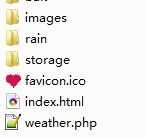
images:存放 button.png 等圖片素材rain:存放背景圖storage:存放 mp3 音樂文件
可改進的地方
這個 Demo 有幾處明顯可以更好:用 eval 解析天氣響應應改為 JSON.parse;滑塊拖拽可以直接過渡到 Pointer Events 統一處理鼠標與觸屏;「下一首預加載」的思路很好,但可以推廣成隊列預取;進度更新用 timeupdate 事件代替每秒輪詢會更省資源。整體架構(狀態 + 定時刷新 + 預加載)則是完全可以沿用的。
- 上一篇文章: 用 JS + Flash 實現跨瀏覽器的代碼複製功能
- 下一篇文章: 如何禁止密碼框的複製、剪切與粘貼
相關文章
-
HTML5 多媒體實作(下):用 audio 元素嵌入音訊的完整指南 仿酷狗 HTML5 手機音樂播放器核心程式碼解析 HTML5 audio 標籤樣式怎麼改?自製播放器的完整思路 HTML5 audio 標簽完全解析:跨瀏覽器音訊播放實戰 《精通 HTML5 編程》第三章:audio 與 video 標籤 HTML5 audio 標籤用法全解:屬性、方法與自製播放器 audio 的 autoplay 在行動裝置失效怎麼辦 HTML5 影音播放器的屬性、方法與事件全整理 用 JavaScript 完全接管 HTML5 audio 標籤 jQuery 多媒體外掛整理:Flash、MP3 與影片播放