為 Bootstrap dropdown 組件擴展 hover 觸發方式
編輯:關於JavaScript
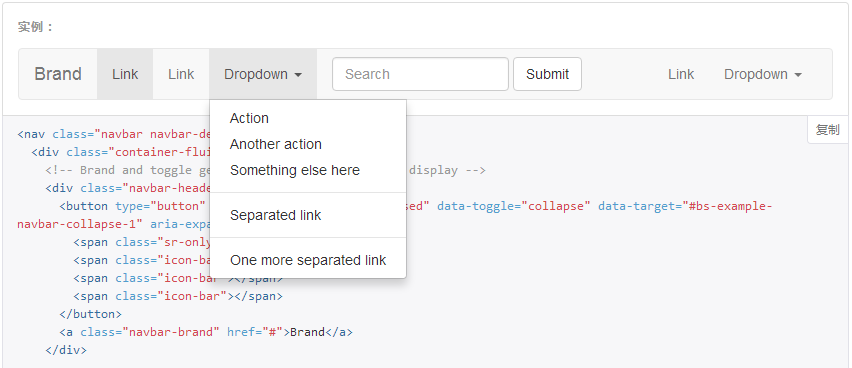
Bootstrap 導航條裡 dropdown 組件的使用頻率非常高,默認是點擊展開。本文介紹如何讓它改成鼠標懸停即展開。
實現思路
仔細觀察會發現,下拉菜單展開時,它的父級元素上會多出一個 open 的 class。既然如此,只要監聽 hover,在移入時給父級加上 open、移出時移除,效果就成了。
社區裡已經有現成的插件 bootstrap-hover-dropdown.js,託管在 GitHub 上。完整代碼如下:
// bootstrap響應式導航條<br>;(function($, window, undefined) { // outside the scope of the jQuery plugin to // keep track of all dropdowns var $allDropdowns = $(); // if instantlyCloseOthers is true, then it will instantly // shut other nav items when a new one is hovered over $.fn.dropdownHover = function(options) { // the element we really care about // is the dropdown-toggle's parent $allDropdowns = $allDropdowns.add(this.parent()); return this.each(function() { var $this = $(this).parent(), defaults = { delay: 500, instantlyCloseOthers: true }, data = { delay: $(this).data('delay'), instantlyCloseOthers: $(this).data('close-others') }, options = $.extend(true, {}, defaults, options, data), timeout; $this.hover(function() { if(options.instantlyCloseOthers === true) $allDropdowns.removeClass('open'); window.clearTimeout(timeout); $(this).addClass('open'); }, function() { timeout = window.setTimeout(function() { $this.removeClass('open'); }, options.delay); }); }); }; $('[data-hover="dropdown"]').dropdownHover(); })(jQuery, this);
注意插件開頭那個分號別刪。這是為了防止上一段 JS 沒有以分號結尾時,兩個文件拼接後語法出錯,屬於常見的防護寫法。
可選參數
delay:延遲關閉的毫秒數。鼠標離開菜單或觸發元素後,等這麼久才收起,默認 500。留出這段緩衝,用戶的鼠標才有時間從按鈕移到菜單項上。
instantlyCloseOthers:布爾值。為 true 時,懸停到新的一項會立即關閉其他已展開的菜單,默認 true。
別忘了加 data 屬性
只引入 JS 是不會生效的,還需要給元素標上 data-hover:
<a href="javascript:;" class="dropdown-toggle" data-toggle="dropdown" data-hover="dropdown"></a>
選項也可以通過 data-delay 和 data-close-others 逐個覆蓋:
<a href="#" class="dropdown-toggle" data-toggle="dropdown" data-hover="dropdown" data-delay="1000" data-close-others="false"></a>
更偷懶的純 CSS 方案
如果要求不高,一行 CSS 也能實現:
.nav > li:hover .dropdown-menu { display: block; }
但這種寫法有個明顯缺陷:先 hover 展開了菜單,接著去點擊它,再 hover 到另一個組件時,畫面容易變得凌亂——
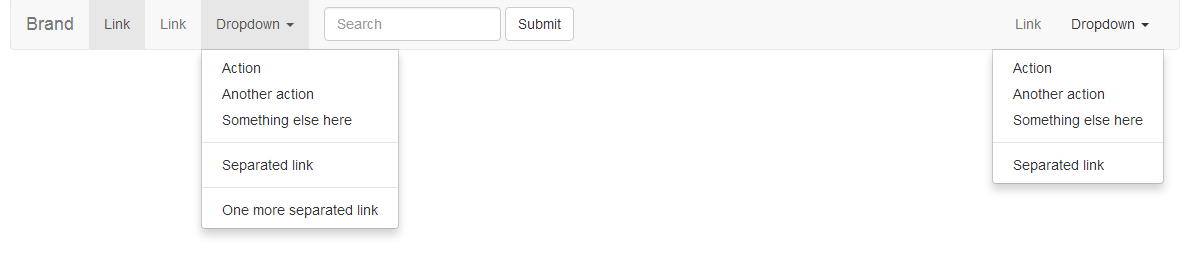
因為 CSS 方案沒有延遲關閉的緩衝,也無法管理多個菜單之間的互斥關係。追求穩妥的話,還是推薦用 JS 插件。
想深入學習可以參考 Bootstrap 學習教程與 Bootstrap 實戰教程兩個專題。以上就是 dropdown 組件擴展 hover 事件的完整做法。
- 上一篇文章: 第一次接觸 RequireJS:前端模塊化加載入門
- 下一篇文章: 深入理解 JavaScript 對象繼承的幾種實現方式