用 jQuery 五分鐘做出專業感的雙色斑馬紋表格
編輯:關於JavaScript
先看成品:
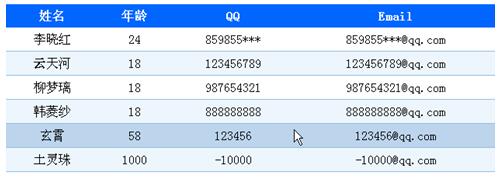
看起來還挺專業對吧?實際上用 jQuery 寫,程式碼不到十行。
第一步:寫好 CSS
這裡定義了三種狀態:表頭、偶數行的底色、滑鼠移入時的高亮。
<style type="text/css">
th {           /* 表頭樣式 */
 background: #0066FF;
 color: #FFFFFF;
 line-height: 20px;
 height: 30px;
}
td {
 padding: 6px 11px;
 border-bottom: 1px solid #95bce2;
 vertical-align: top;
 text-align: center;
}
td * { padding: 6px 11px; }

tr.alt td {  /* 偶數行底色 */
 background: #ecf6fc;
}
tr.over td { /* 滑鼠移入時的高亮 */
 background: #bcd4ec;
}
</style>
第二步:用 jQuery 掛上行為
<script type="text/javascript">
$(function () {
 // 給 class 為 stripe 的表格的偶數行加上 alt
 $(".stripe tr:even").addClass("alt");

 $(".stripe tr").mouseover(function () {
 $(this).addClass("over");
 }).mouseout(function () {
 $(this).removeClass("over");
 });
});
</script>
為什麼能這樣寫:鏈式呼叫
直覺上,mouseover 和 mouseout 應該要分開寫:
$(".stripe tr").mouseover(function () { $(this).addClass("over"); })
$(".stripe tr").mouseout(function () { $(this).removeClass("over"); })
但 jQuery 的方法在執行完之後,會回傳當初操作的那個 jQuery 物件,所以可以直接接著串下去:
$(".stripe tr").mouseover(function () {
 $(this).addClass("over");
}).mouseout(function () {
 $(this).removeClass("over");
})
這就是鏈式呼叫,不只是少寫幾行,更重要的是它只做了一次 DOM 查詢,效能上也更好。
完整可執行的 JSP 範例
<%@ page language="java" import="java.util.*" pageEncoding="UTF-8"%>
<%
 String path = request.getContextPath();
 String basePath = request.getScheme() + "://" + request.getServerName() + ":" + request.getServerPort() + path + "/";
%>
<!DOCTYPE HTML PUBLIC "-//W3C//DTD HTML 4.01 Transitional//EN">
<html>
<head>
 <base href="<%=basePath%>">
 <title>jQuery用幾分鐘時間搞定雙色表格</title>
 <script type="text/javascript" src="mybag/jquery-1.4.2.min.js"></script>
 <script type="text/javascript">
 $(function () {
 $(".stripe tr:even").addClass("alt");
 $(".stripe tr").mouseover(function () {
 $(this).addClass("over");
 }).mouseout(function () {
 $(this).removeClass("over");
 });
 });
 </script>
 <style type="text/css">
 th { background: #0066FF; color: #FFFFFF; line-height: 20px; height: 30px; }
 td { padding: 6px 11px; border-bottom: 1px solid #95bce2; vertical-align: top; text-align: center; }
 td * { padding: 6px 11px; }
 tr.alt td { background: #ecf6fc; }
 tr.over td { background: #bcd4ec; }
 </style>
</head>
<body>
 <!-- 用 class="stripe" 標示要套用此效果的表格 -->
 <table class="stripe" width="50%" border="0" cellspacing="0" cellpadding="0">
 <thead>
 <tr>
 <th>姓名</th>
 <th>年齡</th>
 <th>QQ</th>
 <th>Email</th>
 </tr>
 </thead>
 <tbody>
 <tr><td>李曉紅</td><td>24</td><td>859855***</td><td>859855***@qq.com</td></tr>
 <tr><td>雲天河</td><td>18</td><td>123456789</td><td>123456789@qq.com</td></tr>
 <tr><td>柳夢璃</td><td>18</td><td>987654321</td><td>987654321@qq.com</td></tr>
 <tr><td>韓菱紗</td><td>18</td><td>888888888</td><td>888888888@qq.com</td></tr>
 <tr><td>玄霄</td><td>58</td><td>123456</td><td>123456@qq.com</td></tr>
 <tr><td>土靈珠</td><td>1000</td><td>-10000</td><td>-10000@qq.com</td></tr>
 </tbody>
 </table>
</body>
</html>
延伸:只用 CSS 也能做到
如果目標只是斑馬紋,其實 tr:nth-child(even) { background: #ecf6fc; } 一行 CSS 就足夠了,不必動用 JavaScript。jQuery 方案真正的價值在於滑鼠移入的高亮——那是 CSS 的 :hover 也能做,但若你需要更複雜的互動(例如點擊選取、連動更新其他元素),交給 jQuery 會更有彈性。