解決 Bootstrap Modal 彈出框內輸入框無法獲得焦點的問題
編輯:關於JavaScript
Bootstrap 彈出框(Modal)上層的輸入框無法獲得焦點,是不少開發者都遇到過的坑,以下分享具體分析與解決方法。
問題背景
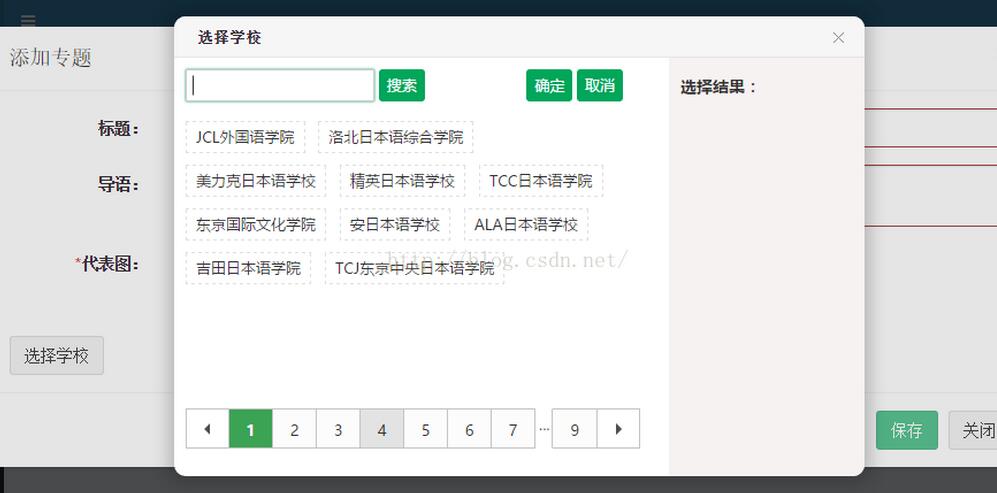
在 Bootstrap 框架中,目前 modal 彈出框僅支援一層,也就是說不能當前彈出框之上再疊加 modal 彈出框。
如果使用自定義彈出框,且其中含有 input 輸入框,卻發現輸入框無法獲得焦點,可能的原因就藏在彈出層的標籤屬性裡。
以下是一個典型的自定義彈出層結構:
<div class="modal fade" tabindex="0" role="dialog" id="myModal" data-backdrop="static"> <div class="modal-dialog modal-lg"> <div class="modal-content"> <div class="modal-header"> <button type="button" class="close" data-dismiss="modal" aria-label="Close"><span aria-hidden="true">×</span></button> <h4 class="modal-title" id="myModalLabel">添加學校</h4> </div> <div class="modal-body"> <form class="form-horizontal" name="myForm" novalidate> <input type="hidden" ng-model="entity.SchID" /> <div class="form-group"> <label for="SchName" class="col-sm-2 control-label">學校名稱:</label> <div class="col-sm-10"> <input type="text" required ng-minlength="3" ng-maxlength="30" class="form-control" ng-model="entity.SchName" name="SchName" placeholder="長度3-30"> <span class="text-danger" ng-show="myForm.SchName.$dirty && myForm.SchName.$invalid"> <span ng-show="myForm.SchName.$error.required">名稱是必須的</span> <span ng-show="myForm.SchName.$error.minlength">最小長度3</span> <span ng-show="myForm.SchName.$error.maxlength">最大長度30</span> </span> </div> </div> <div class="form-group"> <label for="WebSite" class="col-sm-2 control-label">學校官網:</label> <div class="col-sm-10"> <input required type="url" class="form-control" ng-model="entity.WebSite" name="WebSite" placeholder="鏈接地址" /> <span class="text-danger" ng-show="myForm.WebSite.$dirty && myForm.WebSite.$invalid"> <span ng-show="myForm.WebSite.$error.required">姓名是必須的</span> <span ng-show="myForm.WebSite.$error.url">鏈接格式不正確</span> </span> </div> </div> <div class="form-group"> <label for="FoundTime" class="col-sm-2 control-label">建校時間:</label> <div class="col-sm-10"> <input required type="number" class="form-control" ng-model="entity.FoundTime" name="FoundTime" placeholder="年份" /> <span class="text-danger" ng-show="myForm.FoundTime.$dirty && myForm.FoundTime.$invalid"> <span ng-show="myForm.Summary.$error.required">姓名是必須的</span> <span ng-show="myForm.Summary.$error.number">請輸入數字(年份)</span> </span> </div> </div> <div class="form-group"> <label class="col-sm-2 control-label">入學時間:</label> <div class="col-sm-10"> <div class="selectBox" id="selectMonth"></div> <input type="hidden" name="Province" ng-model="entity.MonthList" /> </div> </div> </form> </div> <div class="modal-footer"> <button type="button" class="btn btn-success" ng-disabled="myForm.$invalid" ng-click="addOrUpdate()">保存</button> <button type="button" class="btn btn-default" data-dismiss="modal">關閉</button> </div> </div> </div> </div>
解決方法
問題的根源在於外層 div 上的 tabindex="0" 屬性。只要去掉這個屬性,輸入框就能正常獲得焦點了:
<div class="modal fade" role="dialog" id="myModal" data-backdrop="static">
以上就是本文的全部內容,希望對大家的學習有所幫助。
- 上一篇文章: 用三個 select 實現年月日三級聯動的日期選擇器
- 下一篇文章: 深入理解選擇框腳本:select 與 option 的屬性與操作