微信小程序下拉刷新與上拉加載實作詳解
編輯:關於JavaScript
下拉刷新、上拉加載是行動清單頁的標配。小程序中常見的實作有兩種:用 scroll-view 自行控制,或直接用整個頁面的刷新。本文示範第一種——自己打造輪子,好處是可控性高,缺點是細節需自行打磨。
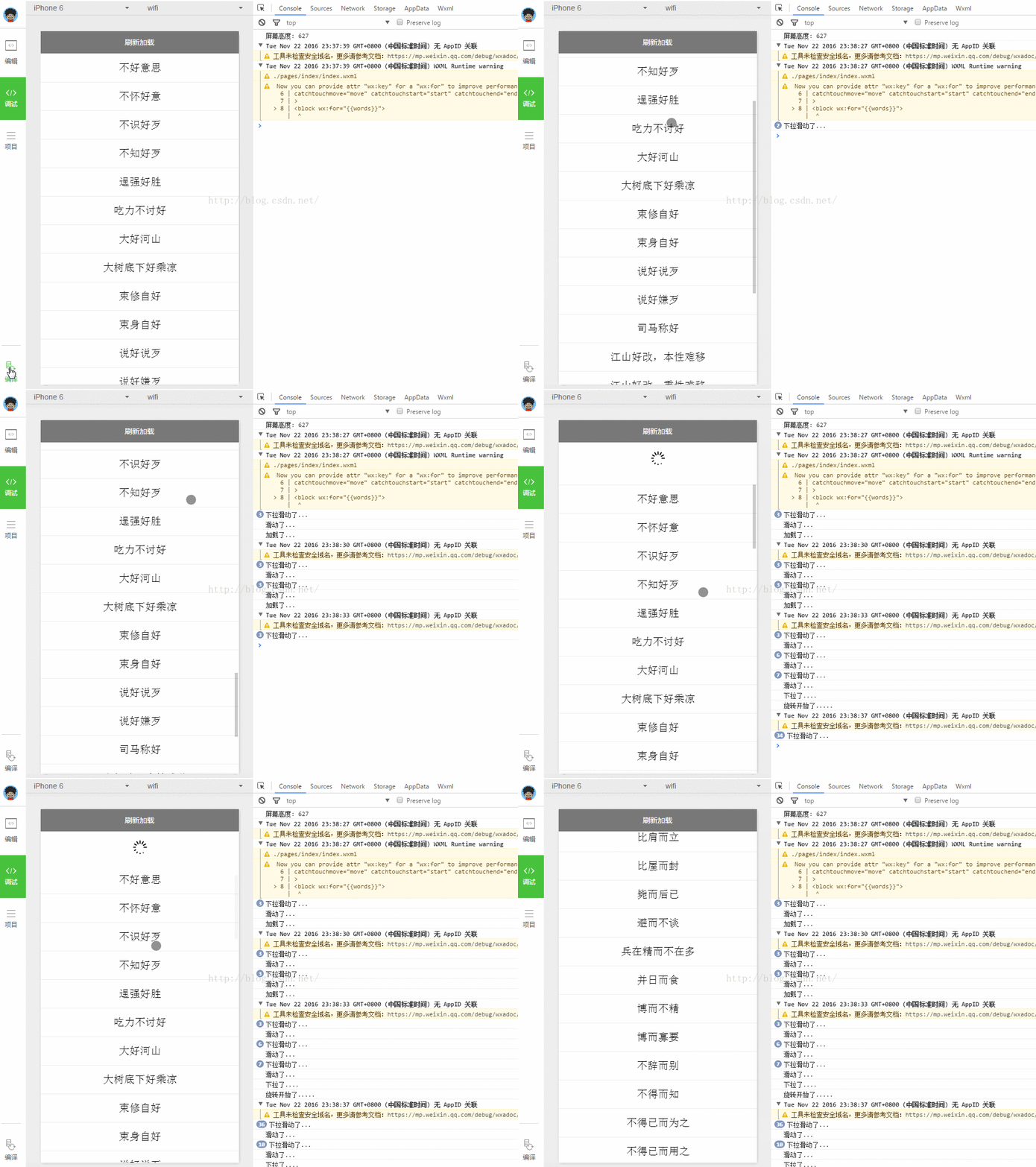
原理
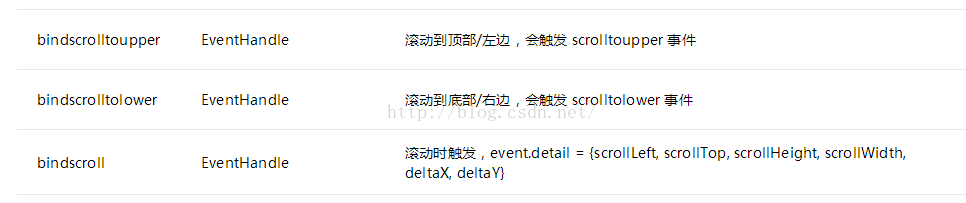
scroll-view 提供了滑動相關的事件監聽,概念上和 Android 的 ScrollView 類似。其中用到了兩個關鍵事件:滑到頂部與滑到底部。
- 下拉刷新:滑到頂部時觸發
bindscrolltoupper,在其中依業務邏輯重新請求資料。 - 上拉加載:滑到底部時觸發
bindscrolltolower,把頁碼加一後請求下一批資料,再將結果串接進 scroll-view 的資料集合。
一、index.js
//index.js
var app = getApp()
Page({
  data: {
    words: [],
    windowHeight: 0,   // 螢幕高度
    refreshHeight: 0,  // 下拉區域高度
    refreshing: false, // 是否正在刷新
    refreshAnimation: {}, // 加載更多旋轉動畫
    clientY: 0         // 觸控時的 Y 軸座標
  },

  onLoad: function () {
    var _this = this;
    // 取得螢幕高度
    wx.getSystemInfo({
      success: function (res) {
        _this.setData({ windowHeight: res.windowHeight });
      }
    });
    // 取得初始資料
    wx.request({
      url: 'https://api.avatardata.cn/ChengYu/Search?key=YOUR_KEY&keyWord=好',
      complete: function (res) {
        if (res.data.reason == 'Succes') {
          _this.setData({ words: res.data.result });
        }
      }
    });
  },

  scroll: function () { console.log("滑動了") },

  // 上拉加載:頁碼加一後請求
  lower: function () {
    var start = 0;
    start += 1;
    var _this = this;
    wx.request({
      url: 'https://api.avatardata.cn/ChengYu/Search',
      data: { key: 'YOUR_KEY', keyWord: '好', page: start },
      complete: function (res) {
        if (res.data.reason == 'Succes') {
          var words = _this.data.words.concat(res.data.result);
          _this.setData({ words: words });
        }
      }
    });
  },

  // 下拉刷新
  upper: function () {
    if (this.data.refreshing) return;
    this.setData({ refreshing: true });
    updateRefreshIcon.call(this);

    var _this = this;
    var i = Math.random();
    i = Math.ceil(i * 10);
    var words = ['龍', '一', '萬', '千', '浩', '金', '得', '而', '可', '人'];
    var word = words[i];

    wx.request({
      url: 'https://api.avatardata.cn/ChengYu/Search?key=YOUR_KEY&keyWord=' + word,
      complete: function (res) {
        if (res.data.reason == 'Succes') {
          setTimeout(function () {
            _this.setData({ words: res.data.result });
          }, 2000);
        }
        setTimeout(function () { _this.setData({ refreshing: false }); }, 2500);
      }
    });
  },

  start: function (e) {
    var startPoint = e.touches[0];
    var clientY = startPoint.clientY;
    this.setData({ clientY: clientY, refreshHeight: 0 });
  },

  end: function (e) {
    var endPoint = e.changedTouches[0];
    var y = (endPoint.clientY - this.data.clientY) * 6;
    if (y > 50) { y = 50; }
    this.setData({ refreshHeight: y });
  },

  move: function (e) { console.log("下拉滑動了") }
})

/** 旋轉加載圖示 */
function updateRefreshIcon() {
  var deg = 0;
  var _this = this;
  var animation = wx.createAnimation({ duration: 1000 });
  var timer = setInterval(function () {
    if (!_this.data.refreshing) clearInterval(timer);
    animation.rotateZ(deg).step();
    deg += 360;
    _this.setData({ refreshAnimation: animation.export() });
  }, 1000);
}
二、index.wxml
<!--index.wxml-->
<view class="refresh-block" style="height: {{refreshHeight}}px;" wx:if="{{refreshing}}">
<image animation="{{refreshAnimation}}" src="/images/refresh.png"></image>
</view>

<scroll-view scroll-y="true" style="height: {{windowHeight}}px;"
  bindscroll="scroll"
  bindscrolltolower="lower"
  bindscrolltoupper="upper"
  catchtouchmove="move"
  catchtouchstart="start"
  catchtouchend="end">
<block wx:for="{{words}}">
<view class="item-style">{{item.name}}</view>
</block>
</scroll-view>
三、index.wxss
/**index.wxss**/
.item-style{
  padding: 30rpx;
  font-size: 40rpx;
  text-align: center;
  border-top: 2rpx solid #eee;
}
.refresh-block {
  padding: 15px;
  text-align: center;
}
.refresh-block image {
  width: 30px;
  height: 30px;
}
實作上的幾個坑
- lower 的頁碼沒有累加:範例中
var start = 0; start += 1;每次呼叫都從 0 開始,永遠只會載入同一頁。正確做法是把 page 放進 data,每次請求成功後再 +1,並用 loading 旗標避免重複觸發。 - scroll-view 需要固定高度:不給 height 的話 scroll-y 不會生效,這是新手最常遇到的問題。
- bindscrolltoupper 觸發門檻:預設距離頂部 50px 才觸發,可用
upper-threshold調整;lower-threshold則控制上拉的提前量。 - catchtouchmove 的副作用:用 catch 攔截 touchmove 會阻擋內層捲動,需仔細測試是否影響正常滑動。
- API 已老舊:
wx.getSystemInfo應改用wx.getWindowInfo,並把 API 網址換成 https(微信已強制要求)。示例中的 setTimeout 假延遲僅為演示,正式環境應依請求實際耗時處理。
更省事的做法
其實小程序提供了現成方案:在 app.json 的視窗設定中加上 "enablePullDownRefresh": true,然後在頁面的 onPullDownRefresh 中實作重新載入,並以 wx.stopPullDownRefresh() 結束。上拉加載則可監聽 onReachBottom 頁面生命週期。使用內建方案能免費獲得系統級的動畫與手勢處理,除非有高度客製需求,否則優先考慮它會更穩定。
- 上一篇文章: 自製 JS 函式求兩字串的最長共同子串
- 下一篇文章: 微信小程序交互與跳轉 API 實戰:Toast、彈窗、導航與動畫
相關文章
-
微信小程序實作換膚功能(夜間模式) 微信小程序上下滾動公告通知實作(swiper 元件) 微信小程序實作:豆瓣電影影評小程序完整程式碼 React Native ListView 下拉刷新與上拉加載實作 微信小程序串接 WebSocket:SpringMVC + Spring + MyBatis 實作 微信小程序 rich-text 元件用法完整解析 微信小程序自訂提示框實作教學(取代 wx.showToast) 微信小程序 movable-view 實現圖片拖動與雙指縮放 微信小程序中如何渲染 HTML 富文本內容(wxParse 實操) 微信小程序如何訪問 Node.js 的 HTTPS 接口服務器