這是個利用零碎時間寫的練習專案,目標是做出類似支付寶「待付款訂單」頁面的效果。功能不多,但涵蓋了倒數計時、自製彈框、字體圖標這幾個常見的前端知識點。
一、功能目標
- 頁面載入後開始倒數(期間可點「取消訂單」,讓支付區塊消失)。
- 倒數結束後,出現「刪除訂單」按鈕。
- 點擊「刪除訂單」,彈出彈框詢問是否確認刪除。
- 點擊「確定」,刪除該訂單區塊。
效果展示:


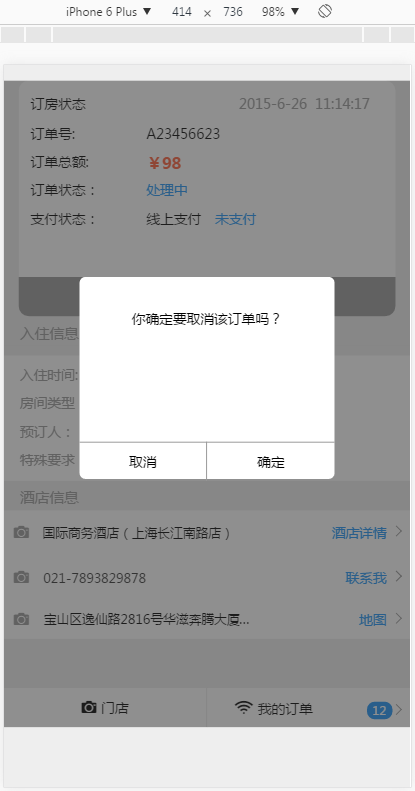

以下提供全部原始碼。若要運行,只需修改 EJS 檔中引入的 CSS 與 JS 路徑即可。
二、JavaScript
order_detail.js
/**
 * Created by mayouchen on 2016/10/20.
 */
$(function () {
  //載入完 DOM 後執行的函式
  var intDiff = parseInt(60); //倒數總秒數

  function timer(intDiff) {
    window.setInterval(function () {
      var day = 0, hour = 0, minute = 0, second = 0; //時間預設值

      if (intDiff > 0) {
        //計算天、小時、分鐘、秒
        day    = Math.floor(intDiff / (60 * 60 * 24));
        hour   = Math.floor(intDiff / (60 * 60)) - (day * 24);
        minute = Math.floor(intDiff / 60) - (day * 24 * 60) - (hour * 60);
        second = Math.floor(intDiff) - (day * 24 * 60 * 60) - (hour * 60 * 60) - (minute * 60);
      }

      if (minute <= 9) minute = '0' + minute;
      if (second <= 9) second = '0' + second;

      $('#day_show').html(day + "天");
      $('#hour_show').html('<s id="h"></s>' + hour + '時');
      $('#minute_show').html('<s></s>' + minute + '分');
      $('#second_show').html('<s></s>' + second + '秒');

      intDiff--;
    }, 1000); //循環函式,讓時鐘動起來

    //另一個計時器:監看倒數是否歸零
    setInterval(function(){
      if($('#minute_show').text() == '00分' && $('#second_show').text() == '00秒'){
        $('.pay-immediately-count').remove();
        $('.cancle-order').remove();
        $('.del-order').show();
        clearInterval();
      }
    }, 1000);

    //以下三個是跳轉鏈接,原本是在 node 專案裡的路由配置,
    //這裡可以換成自己的鏈接
    $("#dingdan").click(function () {
      location.href = "/hotel/order";  //訂單頁
    });
    $("#mengdian").click(function () {
      location.href = "/hotel";        //門店頁
    });
    $(".set-detail").click(function () {
      location.href = "/hotel/detail"; //詳情頁
    });

    //以下都是單擊事件

    /* 點擊刪除按鈕 */
    $('.del-order').click(function(){
      $(".arrow_mask").show();
      $(".cancel-order-dialog").show();
    });

    /* 彈框設定 — 取消鍵 */
    $(".cancle-order-btn").click(function(){
      $(".cancel-order-dialog").hide();
      $(".arrow_mask").hide();
    });

    /* 彈框設定 — 確定鍵 */
    $(".certain-order").click(function(){
      $(".section-first").remove();
      $(".cancel-order-dialog").remove();
      $(".arrow_mask").remove();
      $(".footer").css({ "position": "fixed" });
    });

    /* 取消訂單 */
    $(".cancle-order").click(function(){
      $(".section-first").remove();
      $(".footer").css({ "position": "fixed" });
    });
  }

  //執行上面的函式
  $(function () {
    timer(intDiff);
  });
});
三、HTML 頁面
order_detail.html
<!DOCTYPE html>
<html>
<head>
<meta http-equiv="Content-Type" content="text/html; charset=utf-8" />
<meta charset="utf-8">
<meta content="" name="description">
<meta content="" name="keywords">
<meta content="eric.wu" name="author">
<meta content="application/xhtml+xml;charset=UTF-8" http-equiv="Content-Type">
<meta property="qc:admins" />
<meta content="telephone=no, address=no" name="format-detection">
<!--添加 title 前面的圖片(換成你自己的圖片路徑)-->
<link rel="shortcut icon" href="/images/hotel/zc.png" type="image/x-icon" />
<!--頁面初始化的樣子(這個檔案可以做頁面初始化)-->
<link href="/css/hotel/order_detail.css" rel="stylesheet" type="text/css" />
<!--引入 JQ 檔案-->
<script type="text/javascript" src="/javascripts/lib-cmd/jquery.min2.js"></script>
</head>
<body>
<div class="section-first">
<div class="date-head">
<div class="date-head-statue">
<ul class="date-head-state">
<li>
<div class="reservation-status">
<div>訂房狀態</div>
<div>2015-6-26</div>
<div>11:14:17</div>
</div>
</li>
<div class="space-underline"></div>
<li>
<div class="order-number">
<div>訂單號: </div>
<div>A23456623</div>
</div>
</li>
<li>
<div class="total-order">
<div>訂單總額: </div>
<div>¥98</div>
</div>
</li>
<li>
<div class="order-status">
<div>訂單狀態:</div>
<div>處理中</div>
</div>
</li>
<li>
<div class="payment-status">
<div>支付狀態:</div>
<div>線上支付</div>
<div>未支付</div>
</div>
</li>
<li class="cancel-order">
<div class="pay-immediately">
<div class="pay-immediately-count">
<div class="pay-immediately-count-num">
立即支付
<div class="time-item">
還剩
<span id="minute_show">0分</span>
<span id="second_show">0秒</span>
</div>
</div>
</div>
<div class="cancle-order">取消訂單</div>
<span class="del-order">刪除訂單</span>
</div>
</li>
</ul>
</div>
</div>
</div>
<div class="wide-space_line"><div>入住資訊</div></div>
<div class="check-information">
<ul>
<li>
<div class="check-in-time">
<div>入住時間:</div>
<div>6月25日-6月26日</div>
<div>共1晚</div>
</div>
</li>
<li>
<div class="room-type">
<div>房間類型:</div>
<div>標準間</div>
<div>1間</div>
</div>
</li>
<li>
<div class="booking-person">
<div>預訂人:</div>
<div>馬優晨</div>
<div>1500070188</div>
</div>
</li>
<li>
<div class="special-requirements">
<div>特殊要求:</div>
<div>房間整潔乾淨</div>
</div>
</li>
</ul>
</div>
<div class="wide-space_line"><div>酒店資訊</div></div>
<div>
<ul class="section-body">
<div class="set-detail">
<div>
<a href=""><i class="font-name-icon first-icon"></i></a>
<span class="set-text-detail">國際商務酒店(上海長江南路店)</span>
</div>
<div></div>
<div class="set-text-button">酒店詳情</div>
<div class="greater-number"></div>
</div>
<div class="space-underline"></div>
<div class="set-detail-number">
<div><a href=""><i class="font-name-icon first-icon"></i></a></div>
<div class="set-text-detail2"><a href="tel:120" class="aa">021-7893829878</a></div>
<div class="set-text-button"><a href="tel:120" class="bb">聯系我</a></div>
<div class="greater-number"></div>
</div>
<div class="space-underline"></div>
<div class="set-detail-address">
<div><a href=""><i class="font-name-icon first-icon"></i></a></div>
<div class="set-text-detail set-text-shut">
寶山區逸仙路2816號華滋奔騰大廈A棟14樓
</div>
<div class="set-text-button">地圖</div>
<div class="greater-number"></div>
</div>
</ul>
</div>
<!--遮罩層-->
<div class="arrow_mask"></div>
<!--取消的彈框-->
<div class="cancel-order-dialog">
<div class="cancel-dialog">
<div>你確定要取消該訂單嗎?</div>
<div class="space-underline2"></div>
<div class="shuxian"></div>
<div class="cancel-dialog-btn">
<div class="cancle-order-btn">取消</div>
<div class="certain-order">確定</div>
</div>
</div>
</div>
<div>
<div class="footer">
<div id="mengdian">
<i class="font-name-icon"></i><span>門店</span>
</div>
<div id="dingdan">
<i class="font-name-icon"></i><span>我的訂單</span>
<span class="greater-number-bottom"></span>
<span class="ellipse">12</span>
</div>
</div>
</div>
</body>
</html>
四、CSS
order_detail.css

body{ background: #eeeeee; }

.date-head{ width: 100%; }

.date-head-statue{
  width: 100%;
  font-size: 14px;
  border-radius: 4px;
  padding-left: 15px;
  padding-right: 15px;
}

.date-head-state{
  background: #fff;
  height: 240px;
  border-radius: 10px;
  margin-top: 16px;
  padding-top: 14px;
  position: relative;
}

.reservation-status,
.order-number,
.total-order,
.order-status,
.payment-status,
.pay-immediately,
.pay-immediately-count{
  display: -moz-box;
  -moz-box-orient: horizontal;
  display: -webkit-box;
  -webkit-box-orient: horizontal;
}

.order-number,
.total-order,
.order-status,
.payment-status{ margin-top: 10px; }

.pay-immediately{
  position: absolute;
  bottom: 0px;
  width: 100%;
}

.space-underline {
  border-bottom: 1px solid #999999;
  -webkit-border-image: url(../../images/hotel/border.gif) 1 stretch;
  -webkit-transform: scaleY(0.2);
  -moz-transform: scaleY(0.2);
  -o-transform: scaleY(0.2);
}

.reservation-status div:nth-of-type(2){
  position: absolute; right: 0px;
  margin-right: 90px; color: #999999;
}
.reservation-status div:nth-of-type(3){
  position: absolute; right: 0px;
  margin-right: 26px; color: #999999;
}

.order-number div:nth-of-type(2),
.total-order div:nth-of-type(2),
.order-status div:nth-of-type(2),
.payment-status div:nth-of-type(2){
  position: absolute; left: 0px;
  margin-left: 130px;
}

.reservation-status,
.order-number,
.total-order,
.order-status,
.payment-status{ padding-left: 12px; }

.payment-status div:nth-of-type(3){
  position: absolute; left: 0px;
  margin-left: 200px; color: #1c94f7;
}

.cancel-order{ width: 100%; }

.pay-immediately div:nth-of-type(1){
  width: 70%;
  background: #1c94f7;
  height: 40px;
  line-height: 40px;
  text-align: center;
  border-radius: 0px 0px 0px 10px;
  color: #ffffff;
  padding-left: 20px;
  white-space: nowrap;
}

.pay-immediately div:nth-of-type(2){
  width: 30%;
  height: 40px;
  background: #097bd9;
  line-height: 40px;
  text-align: center;
  border-radius: 0px 0px 10px 0px;
  color: #ffffff;
}

.wide-space_line {
  height: 30px;
  width: 100%;
  background: #eeeeee;
  text-align: center;
}
.wide-space_line div:nth-of-type(1) {
  margin-top: 7px;
  position: absolute;
  left: 0px;
  margin-left: 16px;
  font-size: 15px;
  color: #999999;
}

.total-order div:nth-of-type(2){
  color: #ff5e38;
  font-size: 16px;
  font-weight: bold;
}
.order-status div:nth-of-type(2){ color: #1c94f7; }

.check-in-time,
.room-type,
.booking-person,
.special-requirements{
  display: -moz-box;
  -moz-box-orient: horizontal;
  display: -webkit-box;
  -webkit-box-orient: horizontal;
  margin-left: 16px;
}

.check-in-time div:nth-of-type(1),
.room-type div:nth-of-type(1),
.booking-person div:nth-of-type(1),
.special-requirements div:nth-of-type(1){ color: #999999; }

.check-in-time div:nth-of-type(2),
.room-type div:nth-of-type(2),
.booking-person div:nth-of-type(2),
.special-requirements div:nth-of-type(2){
  color: #333;
  position: absolute;
  left: 0px;
  margin-left: 98px;
}

.check-in-time div:nth-of-type(3){
  color: #333; position: absolute; left: 0px; margin-left: 222px;
}
.room-type div:nth-of-type(3){
  color: #333; position: absolute; left: 0px; margin-left: 152px;
}
.booking-person div:nth-of-type(3){
  color: #333; position: absolute; left: 0px; margin-left: 152px;
}

.check-information{
  background: #ffffff;
  height: 128px;
}
.check-in-time{ padding-top: 10px; margin-top: 10px; }
.room-type,
.booking-person,
.special-requirements{ padding-top: 10px; }

/* 中間列表樣式 */
.section-body .set-detail,
.section-body .set-detail-number,
.section-body .set-detail-address{
  display: -moz-box;
  -moz-box-orient: horizontal;
  display: -webkit-box;
  -webkit-box-orient: horizontal;
  margin-left: 10px;
}

.set-detail,
.set-detail-number{
  padding-top: 13px;
  padding-bottom: 13px;
  text-align: center;
}

.set-detail-address{
  padding-top: 10px;
  padding-bottom: 10px;
  text-align: center;
}

/* 字體圖標:把 icomoon.ttf 放在 fonts 目錄下 */
@font-face{
  font-family: "font-name-icon";
  src: url("../../fonts/icomoon.ttf") format("truetype"),
       url("../../fonts/icomoon.eot?#iefix") format("embedded-opentype"),
       url("../../fonts/icomoon.woff") format("woff"),
       url("../../fonts/icomoon.svg") format("svg");
  font-weight: normal;
  font-style: normal;
}

.font-name-icon{
  font-family: "font-name-icon";
  font-weight: normal;
  font-style: normal;
  font-size: 15px;
  -webkit-font-smoothing: antialiased;
  -moz-osx-font-smoothing: grayscale;
}

.first-icon{ color: #999999; }
.second-icon{ margin-left: 5px; }

.set-text-button{
  position: absolute;
  right: 0px;
  margin-right: 24px;
  font-size: 14px;
  color: #1c94f7;
}

.greater-number {
  position: absolute;
  right: 0;
  margin-right: 10px;
  margin-top: 4px;
  display: inline-block;
  width: 8px; height: 8px;
  border-top: 1px solid #999;
  border-right: 1px solid #999;
  -webkit-transform: rotate(45deg);
  -moz-transform: rotate(45deg);
  -o-transform: rotate(45deg);
}

.greater-number-bottom{
  position: absolute;
  right: 0;
  margin-right: 10px;
  margin-top: 6px;
  display: inline-block;
  width: 8px; height: 8px;
  border-top: 1px solid #999;
  border-right: 1px solid #999;
  -webkit-transform: rotate(45deg);
  -moz-transform: rotate(45deg);
  -o-transform: rotate(45deg);
}

.set-text-detail{
  margin-left: 10px;
  font-size: 13px;
}
.set-text-detail2 .aa{
  margin-left: 15px;
  font-size: 13px;
  color: #333333;
}

.set-text-shut{
  white-space: nowrap;
  text-overflow: ellipsis;
  overflow: hidden;
  width: 221px;
}

.set-text-button .bb{ color: #1c94f7; }

.space_line{
  height: 10px;
  width: 100%;
  background: #eeeeee;
}

.section-body{ background: #ffffff; }

/* 底部按鈕樣式 */
.footer{
  display: -moz-box;
  -moz-box-orient: horizontal;
  display: -webkit-box;
  -webkit-box-orient: horizontal;
  position: relative;
  bottom: 0px;
  width: 100%;
  height: 40px;
  margin-top: 50px;
}
.footer div:nth-of-type(1){
  padding-top: 11px;
  width: 50%;
  border-right: 1px solid #eeeeee;
  background-color: white;
  text-align: center;
}
.footer div:nth-of-type(2){
  padding-top: 12px;
  width: 50%;
  padding-left: 28px;
  background-color: white;
}
.footer span{ padding-left: 5px; }

.pay-immediately div:nth-of-type(3){ display: none; }

.ellipse{
  width: 26px; height: 18px;
  display: block;
  border-radius: 8px;
  background: #1c94f7;
  color: #ffffff;
  position: absolute;
  right: 0px;
  margin-right: 18px;
  margin-top: -17px;
  padding-right: 6px;
  font-size: 10px;
  text-align: center;
  line-height: 18px;
}

/* 倒數計時樣式 */
.time-item {
  background: #C71C60;
  color: #fff;
  line-height: 40px;
  font-size: 14px;
  font-family: Arial;
  padding: 0 10px;
  border-radius: 5px;
}
#day_show {
  float: left;
  line-height: 40px;
  color: #ffffff;
  font-size: 14px;
  margin: 0 10px;
  font-family: Arial, Helvetica, sans-serif;
}
.item-title .unit {
  background: none;
  line-height: 40px;
  font-size: 14px;
  padding: 0 10px;
  float: left;
}
.pay-immediately-count-num{
  display: -moz-box;
  -moz-box-orient: horizontal;
  display: -webkit-box;
  -webkit-box-orient: horizontal;
}

.del-order{
  display: none;
  text-align: center;
  background: #999999;
  height: 40px;
  border-radius: 0px 0px 10px 10px;
  position: absolute;
  bottom: 0px;
  width: 100%;
  color: #fff;
  line-height: 40px;
}

/* 取消按鈕彈出的對話框 */
.arrow_mask {
  position: absolute;
  top: 0; left: 0; bottom: 0; right: 0;
  z-index: 1;
  background: #333333;
  opacity: 0.55;
  display: none;
}

.cancel-order-dialog{
  display: none;
  width: 260px; height: 206px;
  background: #fff;
  border-radius: 6px;
  position: absolute;
  top: 0px;
  margin-top: 200px;
  left: 50%;
  margin-left: -130px;
  z-index: 1;
  padding-top: 33px;
}

.cancel-dialog div:nth-of-type(1){
  text-align: center;
}

.cancel-dialog-btn{
  display: -moz-box;
  -moz-box-orient: horizontal;
  display: -webkit-box;
  -webkit-box-orient: horizontal;
}
.cancel-dialog-btn div:nth-of-type(1){
  width: 130px;
  border-right: 1px solid #999;
  padding: 10px;
  border-top: 1px solid #999;
}
.cancel-dialog-btn div:nth-of-type(2){
  width: 130px;
  text-align: center;
  padding: 10px;
  border-top: 1px solid #999;
}

.space-underline2 { margin-top: 116px; }

.space-underline3 {
  width: 100%;
  height: 10px;
  -webkit-border-image: url(../../images/hotel/border.gif) 1 stretch;
  -webkit-transform: scaleX(0.2);
  -moz-transform: scaleX(0.2);
}
五、reset.css
基礎重置樣式,主要用來抹平各瀏覽器差異,並關掉行動裝置上的點擊高亮。
@charset "utf-8";

*{
  margin: 0;
  padding: 0;
  -webkit-tap-highlight-color: rgba(0, 0, 0, 0);
  -webkit-box-sizing: border-box;
  -moz-box-sizing: border-box;
}

html {
  min-height: 100%;
  font-size: 100%;
  -webkit-text-size-adjust: 100%;
  -ms-text-size-adjust: 100%;
}

body {
  width: 100%;
  min-height: 100%;
  font-family: "Microsoft YaHei", "微軟雅黑", "MicrosoftJhengHei",
               "華文細黑", "Helvetica", "Arial", "sans-serif";
  font-size: 14px;
  position: relative;
  word-break: break-all;
}

a {
  text-decoration: none;
  -webkit-tap-highlight-color: rgba(0, 0, 0, 0.35);
  -webkit-box-sizing: border-box;
}

img {
  -ms-interpolation-mode: bicubic;
  vertical-align: middle;
}
img:not([src*="/"]) { display: none; }

table { border-collapse: collapse; border-spacing: 0; }
textarea { resize: none; }

input, button, select, textarea {
  -webkit-appearance: none;
  outline: none;
  border-radius: 0;
}

input::-webkit-outer-spin-button,
input::-webkit-inner-spin-button {
  -webkit-appearance: none !important;
  margin: 0;
}

ul, ol, li {
  list-style: none;
  -webkit-margin-before: 0;
  -webkit-margin-after: 0;
  -webkit-margin-start: 0;
  -webkit-margin-end: 0;
  -webkit-padding-start: 0;
}

.section-body .text {
  margin-top: 24px;
  margin-left: 40px;
  margin-right: 35px;
  width: 84%;
  font-family: "宋體";
  font-size: 18px;
}

.section-body .textImg {
  margin-top: 45px;
  color: blue;
  text-align: center;
  vertical-align: middle;
}
六、幾個值得探討的實作細節
1. 字體圖標(icon font)的原理
頁面中的 <i class="font-name-icon"></i> 看起來是亂碼,其實是原理所在。@font-face 把自訂字型檔載入為名為 font-name-icon 的家族,而 59663 這個十進位碼(等同 )對應到字型檔中的某個字符圖形。於是瀏覽器渲染時畫出的不是文字,而是圖標。
用 icon font 而非圖片的好處是:可自由改顏色與大小、任意縮放不失真、HTTP 請求數少。缺點是只支援單色,且需要自行維護字型檔。現在更主流的做法是 SVG sprite 或直接內嵌 SVG。
2. 用 scaleY(0.2) 畫 1px 細線
.space-underline 用了 border-bottom: 1px solid 搭配 scaleY(0.2),這是為了在行動裝置上做出比 1px 更細的分隔線——原理與前面討論過的 0.5px 邊框問題相同,都是利用 transform 縮放視覺上的線寬。
3. 彈框定位用 margin-left 做水平居中
left: 50%; margin-left: -130px; 是傳統的水平居中手法:先推到中線,再用負 margin 拉回自身寬度的一半。它能運作,但硬編碼了 130px 這個數字。改用 transform: translateX(-50%) 就無需知道寬度:
.cancel-order-dialog{
  left: 50%;
  transform: translateX(-50%);
}
4. 這份倒數邏輯有兩個可改善處
第一,程式開了兩個獨立的 setInterval,一個跑倒數、一個輪詢檢查是否歸零。輪詢這件事完全可以省掉——在倒數的那個計時器裡判斷 intDiff <= 0 就直接執行收尾即可,不必每秒多跑一次 DOM 查詢。
第二,倒數歸零後呼叫的 clearInterval() 沒有帶任何參數,實際上什麼都不會清掉,那個計時器會永遠跑下去。正確做法是把 interval ID 存起來:
var timerId = window.setInterval(function(){
  //...
  if(intDiff < 0){
    clearInterval(timerId);
    $('.pay-immediately-count').remove();
    $('.cancle-order').remove();
    $('.del-order').show();
  }
}, 1000);
5. 倒數時間最好由後端給
這裡寫死 parseInt(60)。實務上訂單的剩餘付款時間應該由伺服器回傳(例如回傳截止時間戳記),前端再用 deadline - Date.now() 計算。否則使用者重新整理頁面,倒數就會從 60 秒重新開始,等於可以無限延展付款時間。
另外,前端倒數終究只是「顯示用」的。真正的訂單逾時作廢必須由後端機制(排程任務或延遲佇列)處理,前端計時歸零不代表伺服器那邊已經關單。
七、總結
這個練習涵蓋的技術點其實都很基礎:計時器、DOM 顯示與隱藏、遮罩層、字體圖標、CSS 定位。但把「倒數歸零後要清掉計時器」「時間基準該由後端提供」這些細節想清楚,才算是真正把功能做對,而不只是看起來對。
- 上一篇文章: JavaScript 簡易畫板實作:事件、座標與繪圖技巧
- 下一篇文章: fullPage.js 全屏滾動插件實戰:從引入到參數配置全解析