用 JavaScript 寫一個簡潔版的俄羅斯方塊
編輯:關於JavaScript
俄羅斯方塊是練習遊戲開發的經典題目,但很多人以為非得用某個遊戲框架或 Flash 不可。其實純 JavaScript + 幾個絕對定位的 div 就足夠了:方塊用 div 畫、位置用 top/left 控制、碰撞偵測用一個二維表格記錄。以下拆解完整實作。
執行預覽
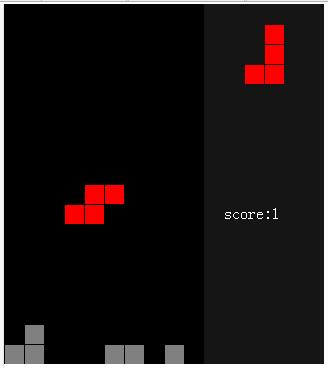
完整程式碼
<!DOCTYPE html>
<html>
<head>
<meta http-equiv="Content-Type" content="text/html; charset=utf-8" />
<title>俄羅斯方塊</title>
<style type="text/css">
.c { margin: 1px; width: 19px; height: 19px; background: red;   position: absolute; }  /* 正在下落的方塊 */
.d { margin: 1px; width: 19px; height: 19px; background: gray;  position: absolute; }  /* 已固定的方塊 */
.f { top: 0px; left: 0px; background: black;   position: absolute; }                   /* 主遊戲區背景 */
.e { top: 0px; background: #151515; position: absolute; }                              /* 預告區背景 */
.g { width: 100px; height: 20px; color: white; position: absolute; }                   /* 分數顯示 */
</style>

<script type="text/javascript">
var row = 18;          // 主遊戲區行數
var col = 10;          // 列數
var announcement = 6;  // 預告區寬度
var size = 20;         // 每格 20px
var isOver = false;

// 7 種方塊的形狀,每 8 個數字代表一個方塊的 4 個小方格的 (x, y) 座標
var shapes = ("0,1,1,1,2,1,3,1;" +
              "1,0,1,1,1,2,2,2;" +
              "2,0,2,1,2,2,1,2;" +
              "0,1,1,1,1,2,2,2;" +
              "1,2,2,2,2,1,3,1;" +
              "1,1,2,1,1,2,2,2;" +
              "0,2,1,2,1,1,2,2").split(";");

var tetris;
var container;

// 建立一個方塊元素並掛到 body
function createElm(tag, css) {
    var elm = document.createElement(tag);
    elm.className = css;
    document.body.appendChild(elm);
    return elm;
}

// 方塊物件:由 4 個 div 組成
function Tetris(css, x, y, shape) {
    var myCss = css ? css : "c";
    this.divs = [createElm("div", myCss), createElm("div", myCss),
                 createElm("div", myCss), createElm("div", myCss)];

    if (!shape) {
        // 只有「正在下落」的方塊需要預告區與分數元素
        this.divs2 = [createElm("div", myCss), createElm("div", myCss),
                      createElm("div", myCss), createElm("div", myCss)];
        this.score = createElm("div", "g");
        this.score.style.top = 10 * size + "px";
        this.score.style.left = (col - -1) * size + "px";
        this.score.innerHTML = "score:0";
    }

    this.container = null;

    this.refresh = function () {
        this.x = (typeof (x) != 'undefined') ? x : 3;
        this.y = (typeof (y) != 'undefined') ? y : 0;

        // 優先序:傳入的參數 > 上一個預告形狀 > 隨機產生
        if (shape)            this.shape = shape;
        else if (this.shape2) this.shape = this.shape2;
        else                  this.shape = shapes[Math.floor(Math.random() * shapes.length - 0.000000001)].split(",");

        // 產生下一個預告形狀
        this.shape2 = shapes[Math.floor(Math.random() * shapes.length - 0.000000001)].split(",");

        // 生成位置已經放不下,代表遊戲結束
        if (this.container && !this.container.check(this.x, this.y, this.shape)) {
            isOver = true;
            alert("遊戲結束");
        } else {
            this.show();
            this.showScore();
            this.showAnnouncement();
        }
    };

    // 顯示方塊
    this.show = function () {
        for (var i in this.divs) {
            this.divs[i].style.top  = (this.shape[i * 2 + 1] - -this.y) * size + "px";
            this.divs[i].style.left = (this.shape[i * 2]     - -this.x) * size + "px";
        }
    };

    // 顯示預告
    this.showAnnouncement = function () {
        for (var i in this.divs2) {
            this.divs2[i].style.top  = (this.shape2[i * 2 + 1] - -1) * size + "px";
            this.divs2[i].style.left = (this.shape2[i * 2] - -1 - -col) * size + "px";
        }
    };

    // 顯示分數
    this.showScore = function () {
        if (this.container && this.score) {
            this.score.innerHTML = "score:" + this.container.score;
        }
    };

    // 水平移動
    this.hMove = function (step) {
        if (this.container.check(this.x - -step, this.y, this.shape)) {
            this.x += step;
            this.show();
        }
    };

    // 垂直移動;若下方已經擋住,就固定形狀並重新生成
    this.vMove = function (step) {
        if (this.container.check(this.x, this.y - -step, this.shape)) {
            this.y += step;
            this.show();
        } else {
            this.container.fixShape(this.x, this.y, this.shape);
            this.container.findFull();
            this.refresh();
        }
    };

    // 旋轉:把 4 個座標圍繞 3,3 這個基準點做 90 度翻轉
    this.rotate = function () {
        var newShape = [this.shape[1], 3 - this.shape[0],
                        this.shape[3], 3 - this.shape[2],
                        this.shape[5], 3 - this.shape[4],
                        this.shape[7], 3 - this.shape[6]];
        if (this.container.check(this.x, this.y, newShape)) {
            this.shape = newShape;
            this.show();
        }
    };

    this.refresh();
}

// 容器物件:負責碰撞偵測、固定方塊、消行與計分
function Container() {
    this.init = function () {
        // 繪製主遊戲區
        var bgDiv = createElm("div", "f");
        bgDiv.style.width  = size * col + "px";
        bgDiv.style.height = size * row + "px";

        // 繪製預告區
        var bgDiv = createElm("div", "e");
        bgDiv.style.left   = size * col + "px";
        bgDiv.style.width  = size * announcement + "px";
        bgDiv.style.height = size * row + "px";

        this.score = 0;
    };

    // 碰撞偵測:以 (行 * 100 + 列) 為索引,記錄已固定的灰色方塊
    this.check = function (x, y, shape) {
        var flag = false;
        var leftmost = col, rightmost = 0, undermost = 0;

        for (var i = 0; i < 8; i += 2) {
            if (shape[i]     < leftmost)  leftmost  = shape[i];
            if (shape[i]     > rightmost) rightmost = shape[i];
            if (shape[i + 1] > undermost) undermost = shape[i + 1];
            if (this[(shape[i + 1] - -y) * 100 - -(shape[i] - -x)]) flag = true;
        }

        // 檢查是否堆到頂(預告區以外的前三列)
        for (var m = 0; m < 3; m++)
            for (var n = 0; n < col; n++)
                if (this[m * 100 + n]) flag = true;

        if ((rightmost - -x + 1) > col || (leftmost - -x) < 0 ||
            (undermost - -y + 1) > row || flag) return false;
        return true;
    };

    // 用灰色方塊取代紅色方塊,並記錄位置
    this.fixShape = function (x, y, shape) {
        var t = new Tetris("d", x, y, shape);
        for (var i = 0; i < 8; i += 2) {
            this[(shape[i + 1] - -y) * 100 - -(shape[i] - -x)] = t.divs[i / 2];
        }
    };

    // 掃描整個容器,把填滿的列消掉
    this.findFull = function () {
        var s = 0;
        for (var m = 0; m < row; m++) {
            var count = 0;
            for (var n = 0; n < col; n++) if (this[m * 100 + n]) count++;
            if (count == col) {
                s++;
                this.removeLine(m);
            }
        }
        this.score -= -this.calScore(s);
    };

    // 一次消多列時的加分遞迴
    this.calScore = function (s) {
        if (s != 0) return s - -this.calScore(s - 1);
        else return 0;
    };

    // 移除指定列,並把上面的方塊整體下移一格
    this.removeLine = function (row) {
        for (var n = 0; n < col; n++) {
            document.body.removeChild(this[row * 100 + n]);
        }
        for (var i = row; i > 0; i--) {
            for (var j = 0; j < col; j++) {
                this[i * 100 - -j] = this[(i - 1) * 100 - -j];
                if (this[i * 100 - -j]) {
                    this[i * 100 - -j].style.top = i * size + "px";
                }
            }
        }
    };
}

function init() {
    container = new Container();
    container.init();

    tetris = new Tetris();
    tetris.container = container;

    // 方向鍵控制:上旋轉、下加速、左右平移
    document.onkeydown = function (e) {
        if (isOver) return;
        var e = window.event ? window.event : e;
        switch (e.keyCode) {
            case 38: tetris.rotate();  break;   // up
            case 40: tetris.vMove(1);  break;   // down
            case 37: tetris.hMove(-1); break;   // left
            case 39: tetris.hMove(1);  break;   // right
        }
    };

    // 每 500ms 自動下落一格
    setInterval("if(!isOver) tetris.vMove(1)", 500);
}
</script>
</head>
<body onload="init()">
</body>
</html>
設計重點
- 形狀用座標陣列表示。每種方塊以 8 個數字描述 4 個小方格的相對位置,旋轉只需把座標做
(x, y) → (y, 3 - x)的變換,優雅又不佔空間。 - 碰撞偵測靠一個「稀疏雜湊表」。以
行 * 100 + 列當索引,把已固定的灰色方塊存進容器的屬性裡;判斷碰撞時只要查該位置有沒有值即可,比二維陣列更好寫。 - 顏色區分狀態。紅色(
.c)是正在操作的方塊,灰色(.d)是已經落地固定的方塊,一眼就能分辨。 - 消行後要整體下移。
removeLine從被消除的那一列往上遍歷,把每一格往下複製一格並更新top,視覺上就完成了「上方方塊落下」的效果。 - -是個小技巧。程式碼裡大量出現的a - -b其實就是a + b,因為座標多以字串形式存放,用減法可以隱式轉型並避開字串拼接的陷阱(可讀性不佳,正式專案建議直接用Number()或parseInt())。
想再進階的話,可以加上「硬降(空白鍵瞬間落底)」、「暫存方塊(Hold)」、等級加速與消行特效,遊戲性會提升不少。
希望本文所述對大家 JavaScript 程式設計有所幫助。
- 上一篇文章: Bootstrap 每日必學:導航條(二)
- 下一篇文章: 用 JS 讓圖片沿圓周排列並旋轉