JavaScript 下拉式選單實作:CSS+jQuery 的漸層滑出手風琴選單
編輯:關於JavaScript
本文示範一個以 CSS 搭配 JavaScript 製作的下拉選單。它採用向下滑出的展開方式,最高支援兩級,是最常見於各類網站的經典樣式,重點在於用純原生 JS 完成高度漸變與透明度的協同動畫,沒有引入任何第三方類庫。
運行效果如下:
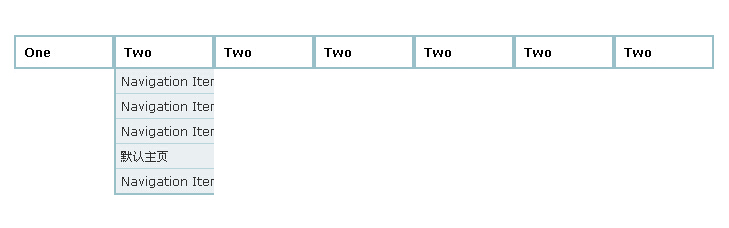
線上預覽:https://demo.jb51.net/js/2015/js-simple-xlcd-down-menu-codes/
動畫原理
核心概念並不複雜:把每個下拉容器的高度從 0 逐步累加到內容實際高度,同時依「目前高度 ÷ 最大高度」同步調整 opacity,讓展開過程帶一點淡入感。收合時反向操作,並用 setTimeout 加入短暫延遲,避免滑鼠在按鈕與內容之間移動時誤觸收合。
完整程式碼
 <!DOCTYPE html PUBLIC "-//W3C//DTD XHTML 1.0 Transitional//EN" "https://www.w3.org/TR/xhtml1/DTD/xhtml1-transitional.dtd">
<html xmlns="https://www.w3.org/1999/xhtml"><head>
<meta http-equiv="Content-Type" content="text/html; charset=UTF-8">
<title>JavaScript下拉菜單演示代碼</title>
<style type="text/css">
body {margin:25px; font:12px Verdana, Arial, Helvetica}
* {padding:0; margin:0}
.dropdown {float:left; padding-right:0px}
.dropdown dt {width:80px; border:2px solid #9ac1c9; padding:8px; font-weight:bold; cursor:pointer; background:url()}
.dropdown dt:hover {background:url()}
.dropdown dd {position:absolute; overflow:hidden; width:100px; display:none; background:#fff; z-index:200; opacity:0}
.dropdown ul {width:100px; border:2px solid #9ac1c9; list-style:none; border-top:none}
.dropdown li {display:inline}
.dropdown a, .dropdown a:active, .dropdown a:visited {display:block; padding:5px; color:#333; text-decoration:none; background:#eaf0f2; width:194px}
.dropdown a:hover {background:#d9e1e4; color:#000}
.dropdown .underline {border-bottom:1px solid #b9d6dc}
</style>
<script language="javascript">
var DDSPEED = 10;   // 每次收合的衰減係數
var DDTIMER = 15;   // 動畫計時間隔(毫秒)

function ddMenu(id, d){
    var h = document.getElementById(id + '-ddheader');
    var c = document.getElementById(id + '-ddcontent');
    clearInterval(c.timer);
    if(d == 1){
        clearTimeout(h.timer);
        if(c.maxh && c.maxh <= c.offsetHeight){ return }
        else if(!c.maxh){
            c.style.display = 'block';
            c.style.height = 'auto';
            c.maxh = c.offsetHeight;   // 先量出真實高度
            c.style.height = '0px';
        }
        c.timer = setInterval(function(){ ddSlide(c, 1) }, DDTIMER);
    }else{
        h.timer = setTimeout(function(){ ddCollapse(c) }, 50);
    }
}

// 收合選單
function ddCollapse(c){
    c.timer = setInterval(function(){ ddSlide(c, -1) }, DDTIMER);
}

function cancelHide(id){
    var h = document.getElementById(id + '-ddheader');
    var c = document.getElementById(id + '-ddcontent');
    clearTimeout(h.timer);
    clearInterval(c.timer);
    if(c.offsetHeight < c.maxh){
        c.timer = setInterval(function(){ ddSlide(c, 1) }, DDTIMER);
    }
}

function ddSlide(c, d){
    var currh = c.offsetHeight;
    var dist;
    if(d == 1){
        dist = (Math.round((c.maxh - currh) / DDSPEED));
    }else{
        dist = (Math.round(currh / DDSPEED));
    }
    if(dist <= 1 && d == 1){ dist = 1; }
    c.style.height = currh + (dist * d) + 'px';
    c.style.opacity = currh / c.maxh;
    c.style.filter = 'alpha(opacity=' + (currh * 100 / c.maxh) + ')';
    if((currh < 2 && d != 1) || (currh > (c.maxh - 2) && d == 1)){
        clearInterval(c.timer);
    }
}
</script>
</head>
<body>
<br><br>
<dl class="dropdown">
 <dt id="one-ddheader" onmouseover="ddMenu('one',1)" onmouseout="ddMenu('one',-1)">One</dt>
 <dd id="one-ddcontent" onmouseover="cancelHide('one')" onmouseout="ddMenu('one',-1)">
  <ul>
   <li><a href="#" class="underline">Navigation Item 1</a></li>
   <li><a href="#" class="underline">Navigation Item 2</a></li>
   <li><a href="#" class="underline">Navigation Item 3</a></li>
   <li><a href="#" class="underline">Navigation Item 4</a></li>
   <li><a href="#">Navigation Item 5</a></li>
  </ul>
 </dd>
</dl>
<dl class="dropdown">
 <dt id="two-ddheader" onmouseover="ddMenu('two',1)" onmouseout="ddMenu('two',-1)">Two</dt>
 <dd id="two-ddcontent" onmouseover="cancelHide('two')" onmouseout="ddMenu('two',-1)">
  <ul>
   <li><a href="#" class="underline">Navigation Item 1</a></li>
   <li><a href="#" class="underline">Navigation Item 2</a></li>
   <li><a href="#" class="underline">Navigation Item 3</a></li>
   <li><a href="#" class="underline">默認主頁</a></li>
   <li><a href="#">Navigation Item 5</a></li>
  </ul>
 </dd>
</dl>
<!-- 其餘 dropdown 結構相同,僅需更換 id 前綴即可 -->
<div style="clear:both"></div>
</body>
</html>
使用要點
- 每組選單需要成對的
id:xxx-ddheader與xxx-ddcontent,這兩個 id 是ddMenu找到 DOM 的唯一依據。 DDSPEED越大收合越快,DDTIMER則控制刷新密度;兩者搭配決定整體手感。cancelHide綁在內容區的 mouseover 上,讓游標移進展開區時不要急著收起,是這類選單好用與否的關鍵細節。
由於全靠原生 API,這份寫法對舊版瀏覽器也有不錯的相容性。希望對你的 JavaScript 開發有所幫助。
- 上一篇文章: JavaScript 圖片輪播實作:含縮圖導航與自訂標題
- 下一篇文章: JavaScript 彈性選單實作:無第三方類庫的緩動位移效果