用正則表達式打造輕量級輸入提示插件
編輯:關於JavaScript
表單輸入的即時校驗是頁面交互裡的高頻需求。本文分享一款以正則表達式為核心的輕量提示插件,它對文本框內容做實時檢測,通用性很強,可以直接搬到自己的項目裡使用。
運行效果圖:
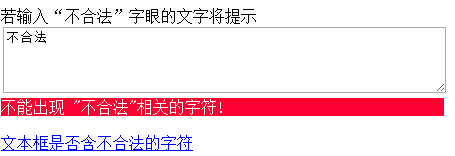
小提示:若瀏覽器中無法正常運行,可以嘗試切換浏覽模式。
調用方式
插件的使用非常直觀:在 inputNotes 中配置若干規則,每條規則包含匹配模式、提示類型與提示文案即可。
$(document).ready(function () {
    $("#message").inputNotes({
        sexwarning: {
            pattern: /(^|\s)色情(\s|$)/ig,
            type: 'warning',
            text: 'Do not type "sex"!'
        },
        numbersnote: {
            pattern: /[0-9]/,
            type: 'note',
            text: 'Do not type numbers!'
        }
    });
});
完整示例代碼
<!DOCTYPE html>
<html xmlns="https://www.w3.org/1999/xhtml">
<head>
<meta http-equiv="Content-Type" content="text/html; charset=utf-8" />
<title>基於正則表達式的輕量提示插件</title>
<script src="js/jquery-1.7.1.js"></script>
<script src="js/jquery.inputnotes-0.6.js"></script>
</head>
<style>
div.inputnotes div.warning { color: #fff; background: #f03; }
</style>
<body>
若輸入"不合法"字眼的文字將提示<br />
<textarea id="message" cols="60" rows="4"></textarea>
<a href="javascript:void(null);" onclick="alert( $('#message').hasInputNotes() )"><br />文本框是否含不合法的字符</a>
<script>
$(document).ready(function () {
    $("#message").inputNotes({
        sexwarning: {
            pattern: /(^|\s)不合法(\s|$)/ig,
            type: 'warning',
            text: '不能出現 "不合法"相關的字符!'
        },
        numbersnote: {
            pattern: /[0-9]/,
            type: 'note',
            text: 'Do not type numbers!'
        }
    });
});
</script>
</body>
</html>
只需引入 jQuery 與插件文件,再按上述結構配置規則,就能得到一套可擴展的輸入提示方案。新增規則時不必改動插件本身,這也是正則驅動的設計在可維護性上的優勢。
- 上一篇文章: JavaScript 變量、作用域與內存機制全面梳理
- 下一篇文章: 四向切換的精美幻燈片畫集特效實現