用 JavaScript 把陣列資料動態填入 Select 下拉選單
編輯:關於JavaScript
本文示範如何把陣列中的資料動態塞進 Select 下拉選單。做法是先在 JavaScript 中宣告一個陣列存放選項文字,觸發時再用迴圈逐一建立 Option 物件掛進 select 元素。這個範例把填充動作綁在下拉框的 onFocus 上,也就是滑鼠點下去、選單即將展開的瞬間才載入;日後要換內容,只要改陣列裡的值即可,很適合前端做本地化的靜態選項處理。
運行效果截圖如下:
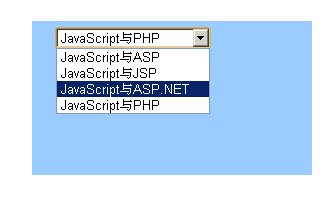
線上展示:https://demo.jb51.net/js/2015/js-array-add-select-data-codes/
完整程式碼:
<!DOCTYPE HTML PUBLIC "-//W3C//DTD HTML 4.01 Transitional//EN" "https://www.w3.org/TR/html4/loose.dtd"> <html> <head> <meta http-equiv="Content-Type" content="text/html; charset=gb2312"> <title>將數組中的數據添加到下拉菜單中</title> <style type="text/css"> <!-- .style1 {color: #FFFFFF} --> </style> <script type="text/javascript"> var counts; counts=0; arr = new Array("JavaScript與ASP","JavaScript與JSP","JavaScript與ASP.NET","JavaScript與PHP"); counts=arr.length; function Myselect(){ var i; for (i=0;i < counts; i++) { document.form1.sel.options[i] = new Option(arr[i],i); } } </script> </head> <body> <table width="280" height="160" border="0" align="center" cellpadding="5" cellspacing="0"> <tr> <td height="34" align="center"><span class="style1" style="font-weight:bold ">將數組中的數據添加到下拉菜單中</span></td> </tr> <tr> <td align="center" valign="top" bgcolor="#9ACCFF"><form name="form1"> <table width="235" height="69" border="0" align="center" cellpadding="0" cellspacing="0"> <tr> <td height="21"><select name="sel" id="sel" onFocus="Myselect()"> </select></td> </tr> <tr> <td height="120"> </td> </tr> </table> </form></td> </tr> </table> </body> </html>
關鍵是 new Option(文字, 值) 這個語法。它建立一個選項物件,第一個參數是使用者看到的顯示文字,第二個是送表單時的實際值;範例裡兩者分別用 arr[i] 與索引 i,所以送出的會是 0、1、2、3 這樣的序號。若希望送出的是文字本身,把第二個參數改成 arr[i] 即可。
有幾個地方實作時可以調整:
觸發時機。用 onFocus 每次聚焦都會重跑一次迴圈,若選項很多會有輕微延遲。改成在 window.onload 時填充一次,或改用 DOMContentLoaded,體驗會更順。
重複填充。此範例的 select 一開始是空的,所以直接寫入沒問題。若選單已有內容,記得先清空(把 options.length 設為 0)再填,否則會出現殘留的舊選項。
清空寫法。移除選項時,除了逐一設為 null,也可以直接用 select.options.length = 0,一行搞定。
希望本文所述對大家的 JavaScript 程式設計有所幫助。
- 上一篇文章: 不送出表單也能讀取單選按鈕值的 JavaScript 做法
- 下一篇文章: 從一個「刷星星」小腳本看瀏覽器自動化的原理與界線
相關文章
-
JavaScript 操作 select 下拉選單:新增、刪除、取值、改值八個常用動作 select 與 option 操作全攻略:取值、改順序、動態增刪 用 JavaScript 取得 Select 下拉選單當前選中值的完整做法 用陣列實作 select 二級聯動的經典寫法 動態新增 option 並讀取 value 與 text 用下拉選單(select)動態切換圖片的實作方法 用 JavaScript 動態為 select 加入 option 的方法 JavaScript 實作省市區三級聯動選單(純前端、無重新整理) JavaScript 仿遊戲選單:下拉式二級聯動實作 原生 JavaScript 打造省市二級聯動下拉選單