預設情況下,XForms 提交會把整份實例丟出去。但真實專案裡,一份實例往往同時裝著畫面用的資料與要送給服務的訊息,全送並不合理。這篇技巧示範如何只把實例的特定片段送進 Web 服務。
建立帶有實例的基本表單
清單 1. 基本表單
<Html
 XMLns="https://www.w3.org/1999/xHtml"
 XMLns:xforms="https://www.w3.org/2002/xforms"
 xmlns:xsd="https://www.w3.org/2001/XMLSchema"
 xmlns:xsi="https://www.w3.org/1999/XMLSchema-instance"
 xmlns:ev="https://www.w3.org/2001/XML-events"
 xmlns:SOAP-ENV="https://schemas.XMLsoap.org/soap/envelope/"
>
 <head>
 <title>XForms and Web Services</title>
 </head>
 <body>
 <object id="FormsPlayer"
 classid="CLSID:4D0ABA11-C5F0-4478-991A-375C4B648F58">
 <b>FormsPlayer has not loaded. Please check your installation.</b>
 </object>
 <?import namespace="xforms" implementation="#FormsPlayer" ?>
 <xforms:model id="WeatherService">
 <xforms:instance id="weatherInstance" >
 <data>
 <employees>
 <emp id="1">
 <name>Nick</name>
 <zip>10314</zip>
 </emp>
 <emp id="2">
 <name>Troy</name>
 <zip>90210</zip>
 </emp>
 <emp id="3">
 <name>Bob</name>
 <zip>34652</zip>
 </emp>
 </employees>
 <soapmessage>
 <SOAP-ENV:Envelope
 xmlns:SOAP-ENV="https://schemas.XMLsoap.org/soap/envelope/"
 xmlns:xsi="https://www.w3.org/1999/XMLSchema-instance"
 xmlns:xsd="https://www.w3.org/1999/XMLSchema">
 <SOAP-ENV:Body>
 <ns1:getTemp XMLns:ns1="urn:xmethods-Temperature"
 SOAP-ENV:encodingStyle=
 "https://schemas.XMLsoap.org/soap/encoding/">
 <zipcode xsi:type="xsd:string"></zipcode>
 </ns1:getTemp>
 </SOAP-ENV:Body>
 </SOAP-ENV:Envelope>
 </soapmessage>
 </data>
 </xforms:instance>
 </xforms:model>
</body>
</Html>這份實例有兩個區塊:employees 放的是畫面要用的員工資料,soapmessage 放的則是準備送出的 SOAP 訊息。想法是先用員工資料把表單填起來,等使用者選好人之後再送出 SOAP 訊息。
用 select1 把員工資料接進畫面
清單 2. 加入 select1 選單
...
 </xforms:model>

 <xforms:select1 appearance="minimal"
 ref="instance('weatherInstance')//zipcode">
 <xforms:label>Choose Employee</xforms:label>
 <xforms:itemset nodeset="instance('weatherInstance')//emp">
 <xforms:label ref="name"/>
 <xforms:value ref="zip"/>
 </xforms:itemset>
 </xforms:select1>
</body>
</Html>
itemset 會逐一走訪每個 emp 元素,動態產生一個下拉選單:
圖 1:基本的資料控制項
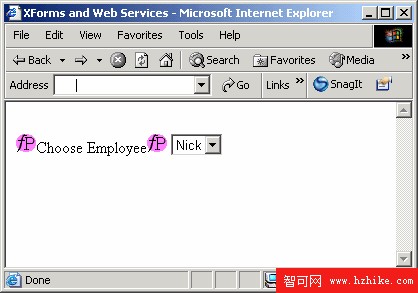
因為 select1 的 ref 直接指向 SOAP 訊息裡的 zipcode 元素,所以使用者只要動一下下拉選單,請求裡該填的值就自動就位了。這種「畫面直接寫入請求本文」的做法,省掉了中間的搬運程式碼。
用 switch 切分提交前後的畫面
這個專案的目標是:送出 SOAP 訊息、取回 SOAP 回應、把結果顯示出來。難點在於,為控制項供數的實例在提交前後並不一樣,因此畫面得分成兩種狀態。
清單 3. 完成表單
...
 </data>
 </xforms:instance>
 </xforms:model>
 <xforms:switch id="switch1">
 <xforms:case id="requestGUI">
 <xforms:select1 appearance="minimal"
 ref="instance('weatherInstance')//zipcode">
 <xforms:label>Choose Employee</xforms:label>
 <xforms:itemset nodeset="instance('weatherInstance')//emp">
 <xforms:label ref="name"/>
 <xforms:value ref="zip"/>
 </xforms:itemset>
 </xforms:select1>

 <xforms:trigger style="display:block">
 <xforms:label>Get sensor ambient temperature</xforms:label>
 <xforms:action ev:event="DOMactivate">
 <xforms:send submission="getweather" />
 <xforms:toggle case="responseGUI" />
 </xforms:action>
 </xforms:trigger>
 </xforms:case>
 <xforms:case id="responseGUI">
 <xforms:output ref="instance('weatherInstance')//return">
 <xforms:label>Employee local temperature:</xforms:label>
 </xforms:output>
 </xforms:case>
</xforms:switch>
</body>
</Html>
第一個 case(requestGUI)放員工選單與 trigger 按鈕。使用者按下按鈕時,瀏覽器送出名為 getweather 的提交,同時切換到 responseGUI,在新的結構裡找資料並顯示 return 元素的氣溫值。
關鍵:告訴 submission 只送哪一段
最直覺的寫法如下:
清單 4. 最簡單的 submission 元素
<xforms:submission method="text-XML-post"
 action="https://services.xmethods.Net:80/soap/servlet/rpcrouter" />
這能動,但不夠好。它與傳統 HTML 表單的行為一樣:把整份實例送到 action 指定的網址,然後用收到的回應取代整個頁面。這顯然不是我們要的——我們只想送 soapmessage 裡的內容,回應也只該更新實例,不該把表單其他部分一起推翻。
在 submission 元素裡可以精確指定這兩件事:
清單 5. 完整設定的 submission 元素
...
 </SOAP-ENV:Body>
 </SOAP-ENV:Envelope>
 </soapmessage>
 </data>
 </xforms:instance>

 <xforms:submission id="getweather" method="text-XML-post"
 ref="instance('weatherInstance')//soapmessage/*"
 replace="instance"
 action="https://services.xmethods.Net:80/soap/servlet/rpcrouter"
 />
</xforms:model>兩個屬性解決了問題:ref="instance('weatherInstance')//soapmessage/*" 限定只送 soapmessage 底下那一層內容,replace="instance" 則指定回應只用來替換實例,而不是整個文件。
這裡有個容易踩到的細節:即使送出的只是實例的一部分,Web 服務回應時仍會替換整份實例。這是一場單向交易,原來的員工資料會被洗掉。若想避免,可以改用 replace="none",讓回應不取代任何內容——但這只適用於「提交本身就是目的、回應不重要」的情境。
結語
XForms 表單允許你在同一份實例裡同時放 SOAP 訊息與其他資料。以本例來說,實例用另一個來源的資料(員工清單)把真正的 SOAP 訊息填起來;然後透過 submission 元素的 ref 屬性指定實例的哪一部分需要送出,再用 replace 屬性決定回應要如何處理。把這兩個屬性想清楚,表單與服務之間的邊界就能畫得乾淨俐落。
- 上一篇文章: 實作教學:用一個 XForms 表單串起兩個 Web 服務
- 下一篇文章: 實作教學:用兩個實例優雅地呼叫 XForms Web 服務