Canvas 指的其實就是「畫布」。近來對用 HTML5 寫遊戲頗有興趣,於是就先從 Canvas 開始小試身手。
我最早接觸 Canvas 是在 Silverlight 與 WPF 上。在那個環境裡,Canvas 是一個絕對定位的容器,裡面可以放任何控制項,我們用它搭畫布、做圖形應用,甚至 GIS 應用。HTML5 的 Canvas 名字相同,思路卻不太一樣。
標籤本身與尺寸概念
在 HTML5 中,canvas 是一個新增的標籤:
<canvas></canvas>
它具備一般 HTML 標籤的所有屬性,style 也照樣能設:
<canvas style="width:400px;height:300px;"></canvas>
<style>
canvas{width:400px;height:400px;background:#000;}
</style>
此外它還有專屬的 attribute:
<canvas height="300" width="400"></canvas>
這裡的 height、width 和以往 HTML 標籤的 attribute 不同,也和 style 裡的 height、width 不同:標籤上的數值代表的是「畫布內部的座標範圍」,而 style 裡的數值代表的是「實際顯示的大小」。
兩組數值不一致時會怎樣
舉例來說,定義一個這樣的 canvas:
<canvas width="400" height="300" style="width:600px;height:450px;border:1px solid #000;"></canvas>
然後在裡面畫一個座標 (100, 50)、大小 200×150 的矩形,實際呈現如下:
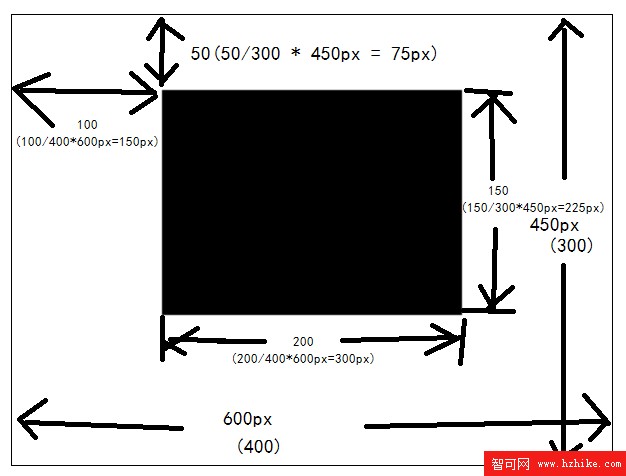
圖中 canvas 的顯示尺寸由 style 決定,是 600px × 450px;但填滿整個畫布的座標只有 400 × 300,也就是括號裡那組數字。於是 (100, 50) 這個座標會被換算成螢幕上的 150px、75px,矩形尺寸也從 200×150 變成 300px×225px。整體是被等比放大了。
你可以照下面的程式碼自己試一次:
<!doctype Html>
<Html>
<body>
<canvas width="400" height="300" style="width:600px;height:450px;border:1px solid #000;"></canvas>
<script>
var context = document.getElementsByTagName("canvas")[0].getContext("2d");
context.fillRect(100,50,200,150);
</script>
</body>
</Html>
getContext():拿到畫圖的那把筆
canvas 還有其他 attribute,而最重要的方法莫過於 getContext(),它就是取得繪圖物件的那道門。
var canvas = document.getElementsByTagName("canvas")[0];
var context = canvas.getContext("2d");
在開發者工具主控台裡,可以直接看到這個 2d drawing context 的屬性與方法:
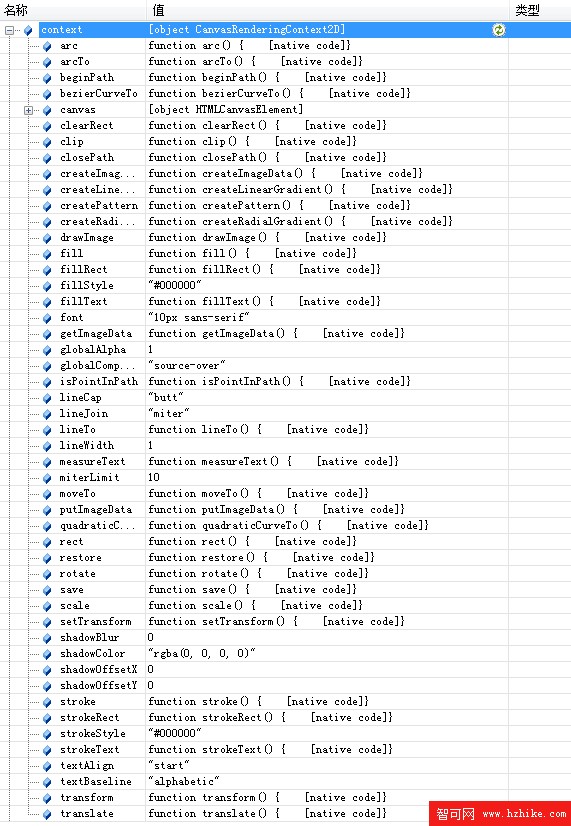
其中包含 fillStyle、strokeStyle、lineCap、font 這類「畫筆樣式」屬性,也有 fillRect、strokeRect、beginPath、moveTo、lineTo、closePath、stroke、fill、drawImage 這些「畫圖動作」方法,另外還有 transform、save 等狀態管理工具。
常用屬性與方法速查
- fillStyle:填充樣式,接受顏色值,例如紅色
#ff0000。 - strokeStyle:線條樣式。
- font:文字樣式。
- fillRect(x, y, width, height):依 fillStyle 直接填滿一個矩形。
- strokeRect(x, y, width, height):依 strokeStyle 描出一個矩形邊。
- beginPath():開始一條路徑,搭配 moveTo/lineTo/closePath 畫折線或多邊形。
- moveTo(x, y):把畫線起點移到新座標。
- lineTo(x, y):從目前點連到目標點。
- closePath():從目前點連回起點。
- stroke():沿著上面的路徑,用 strokeStyle 描線。
- fill():沿著上面的路徑,用 fillStyle 填色。
- drawImage(image, x, y, width, height):把 Image 物件畫到畫布上。務必確認圖片已載入完成才呼叫,例如
var img = new Image(); img.src="test.png"; img.onload = function(){ /* 這裡才能畫 */ }。
畫矩形與畫折線
context.fillRect(100,50,200,150);
context.beginPath();
context.moveTo(10,10);
context.lineTo(10,110);
context.lineTo(110,110);
context.lineTo(110,10);
context.closePath();
context.stroke();
和 Silverlight Canvas、.NET Bitmap、HTML div 的比較
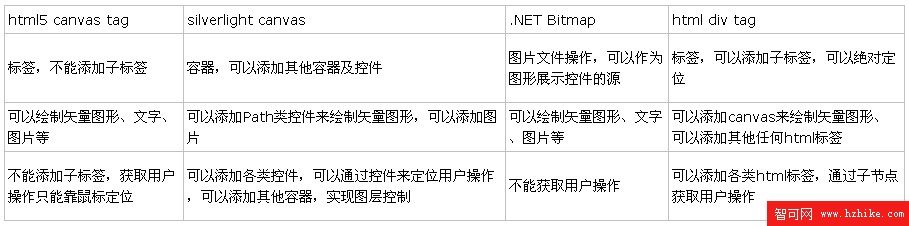
Canvas 很會畫圖,但在使用者互動這塊顯得力不從心。 personally 覺得它比較接近 Bitmap,像是把 Bitmap 搬到瀏覽器端的一個版本。Canvas 本身能做到的事情有限,但只要搭配其他瀏覽器端技術,能創造出的應用遠比想像中多。
- 上一篇文章: 為 HTML5 網頁加上互動音效:打造一個輕量播放元件
- 下一篇文章: 用 HTML5 Canvas 做一個轉圈圈的 Loading 動畫