JS + div 實現 TAB 切換與無縫文字滾動
編輯:關於JavaScript
本文把兩個常見效果合在一起演示:一個是 TAB 式內容切換,一個是無縫滾動的文字/圖片列表。兩部分互不耦合,可以按需剝離單獨使用。為了演示方便,示例中用數字代替了真實圖片,接入項目時換成 img 即可。
滾動部分還有個實用細節:鼠標移入暫停、移出繼續,方便用戶看清內容。
運行效果截圖如下:
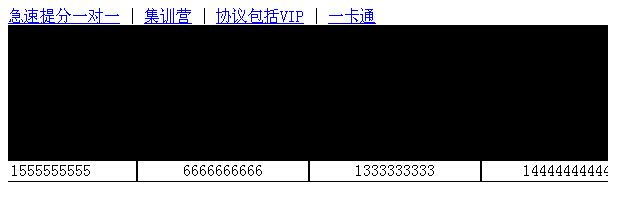
在線演示地址:https://demo.jb51.net/js/2015/js-div-txt-pic-scroll-cha-style-codes/
實現思路
TAB 切換沿用經典的 lunTab 函數:遍歷各面板,目標項顯示並加 on 類,其餘隱藏。
滾動則採用「雙份內容拼接」的經典技巧:把 #demo1 的 HTML 複製給 #demo2 緊接其後,容器 #indemo 寬度設為 800%,然後定時遞增 #demo 的 scrollLeft;當滾過第一份內容寬度時,把 scrollLeft 回退一份寬度,視覺上就實現了無縫循環。
具體代碼
<!DOCTYPE html PUBLIC "-//W3C//DTD XHTML 1.0 Transitional//EN" "https://www.w3.org/TR/xhtml1/DTD/xhtml1-transitional.dtd">
<html xmlns="https://www.w3.org/1999/xhtml">
<head>
<meta http-equiv="Content-Type" content="text/html; charset=utf-8" />
<title>TAB切換和文字滾動</title>
<style type="text/css">
#demo { background: #FFF; overflow:hidden; width: 600px; }
#demo img { border: 3px solid #F2F2F2; }
#indemo { float: left; width: 800%; }
#demo1 { float: left; }
#demo2 { float: left; }
</style>
<link href="images/css.css" rel="stylesheet" type="text/css" />
<script language="javascript" type="text/javascript">
function lunTab(m) {
    for(var j=1; j<=4; j++) {
        if(m==j) {
            document.getElementById("div"+j).style.display = "block";
            document.getElementById("3"+j).className = "on";
        } else {
            document.getElementById("div"+j).style.display = "none";
            document.getElementById("3"+j).className = "";
        }
    }
}
</script>
</head>
<body>
<div class="main-center clearfix">
<div class="txt">
<div class="tit">
<a href="#" id="31" onmouseover="lunTab(1)">急速提分一對一</a> |
<a href="#" id="32" onmouseover="lunTab(2)">集訓營</a> |
<a href="#" id="33" onmouseover="lunTab(3)">協議包括VIP</a> |
<a href="#" id="44" onmouseover="lunTab(4)">一卡通</a>
</div>
<div class="box-b" id="div1" style="display: block;">
<div id="demo">
<div id="indemo">
<div id="demo1">
<div style="border:1px solid #000;overflow:hidden;height:155px;width:170px;text-align:center;float:left">1333333333</div>
<div style="border:1px solid #000;overflow:hidden;height:155px;width:170px;text-align:center;float:left">14444444444</div>
<div style="border:1px solid #000;overflow:hidden;height:155px;width:170px;text-align:center;float:left">1555555555</div>
<div style="border:1px solid #000;overflow:hidden;height:155px;width:170px;text-align:center;float:left">6666666666</div>
</div>
<div id="demo2"></div>
</div>
</div>
</div>
<div class="box-b" id="div2" style="display: none;">
<div style="width:170px;height:135px;background-color:#000;font-size:24px;color:#FFF;float:left;overflow:hidden;">3</div>
<div style="width:170px;height:135px;background-color:#000;font-size:24px;color:#FFF;float:left;">4</div>
</div>
<div class="box-b" id="div3" style="display: none;">
<div style="width:170px;height:135px;background-color:#000;font-size:24px;color:#FFF;float:left;overflow:hidden;">5</div>
<div style="width:170px;height:135px;background-color:#000;font-size:24px;color:#FFF;float:left;">6</div>
</div>
<div class="box-b" id="div4" style="display: none;">
<div style="width:170px;height:135px;background-color:#000;font-size:24px;color:#FFF;float:left;overflow:hidden;">7</div>
<div style="width:170px;height:135px;background-color:#000;font-size:24px;color:#FFF;float:left;">8</div>
</div>
</div>
</div>
<script>
var speed = 10;
var tab = document.getElementById("demo");
var tab1 = document.getElementById("demo1");
var tab2 = document.getElementById("demo2");
tab2.innerHTML = tab1.innerHTML;
function Marquee(){
    if(tab2.offsetWidth - tab.scrollLeft <= 0)
        tab.scrollLeft -= tab1.offsetWidth
    else
        tab.scrollLeft++;
}
var MyMar = setInterval(Marquee, speed);
tab.onmouseover = function() { clearInterval(MyMar) };
tab.onmouseout = function() { MyMar = setInterval(Marquee, speed) };
</script>
</body>
</html>
調 speed 可以控制滾動快慢,改 #demo 的寬度與子項尺寸則能適配不同的版面。若列表項高度不一致,建議改用 scrollTop 縱向滾動或 CSS transform 方案,避免 scrollLeft 在換行時出現跳動。
- 上一篇文章: 原生 JS 實現 div 拖拽並回放運動軌跡
- 下一篇文章: JavaScript 圖片延遲加載的三種實現方案