用 Bootstrap 打造登錄界面的實作範例
編輯:JQuery入門技巧
Bootstrap 是一個開源的前端 Web 開發框架,提供了豐富的樣式與元件。這幾天我研究了 Bootstrap 的官方文件,看到其中的 Basic-form,便想動手做一個登錄界面。整體思路理清後,就開始實作。
程式碼寫起來其實並不難,但過程中遇到一個問題:Bootstrap 的柵格類 .col 似乎不太容易實現居中顯示。雖然可以用 modal(模態框)實現彈出居中,但我暫時不想用 modal。於是想著自己定義一段 CSS 來控制,同時也很好奇是不是只用 Bootstrap 就能實現居中。折騰了大半天,最終還是選擇自己寫 CSS 讓 div 居中——並不是不懂 CSS,單純是想驗證一下。廢話不多說,先上圖:
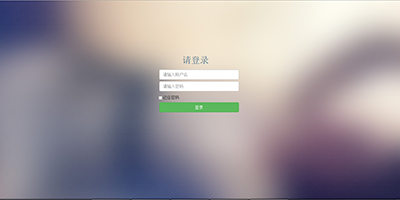
本界面使用的 Bootstrap 版本為 v3.3.5。
style.css
這段自訂 CSS 主要用來控制登錄框外層 div 的居中與間距:
body {
    background: url(../img/login_bg_0.jpg) #f8f6e9;
}
.mycenter{
    margin-top: 100px;
    margin-left: auto;
    margin-right: auto;
    height: 350px;
    width: 500px;
    padding: 5%;
}
.mycenter input, checkbox, button{
    margin-top: 2%;
    margin-left: 10%;
    margin-right: 10%;
}
.mycheckbox{
    margin-top: 10px;
    margin-left: 40px;
    margin-bottom: 10px;
    height: 10px;
}
login.html
<!DOCTYPE html>
<html>
<head>
<meta charset="utf-8" />
<title>用戶登錄</title>
<link rel="stylesheet" href="css/bootstrap.min.css" />
<link rel="stylesheet" href="css/style.css" />
<script src="js/bootstrap.min.js"></script>
</head>
<body>
<form action="login.php" method="post">
<div class="mycenter">
  <div class="mysign">
    <div class="col-lg-11 text-center text-info">
      <h2>請登錄</h2>
    </div>
    <div class="col-lg-10">
      <input type="text" class="form-control" name="username" placeholder="請輸入賬戶名" required autofocus/>
    </div>
    <div class="col-lg-10">
      <input type="password" class="form-control" name="password" placeholder="請輸入密碼" required autofocus/>
    </div>
    <div class="col-lg-10 mycheckbox checkbox">
      <input type="checkbox" class="col-lg-1">記住密碼
    </div>
    <div class="col-lg-10">
      <button type="button" class="btn btn-success col-lg-12">登錄</button>
    </div>
  </div>
</div>
</form>
</body>
</html>
【注意】此範例在 Chrome 瀏覽器上顯示正常,但在 IE8 上存在相容性問題,尚未針對 IE 做額外處理,後續會再更新優化。
以上就是用 Bootstrap 實現登錄界面的實作範例,希望對大家有所幫助。
- 上一篇文章: 用 jQuery EasyUI 右鍵選單關閉標籤/選項卡的完整分享
- 下一篇文章: 深入理解 Bootstrap 框架:整體架構篇
熱門推薦
搞懂 jQuery 的 eq() 與 DOM 的 element[] 差在哪
jQuery 輪播圖與 extend 擴充技巧
jQuery autoComplete 外掛:兩種資料來源模式與動態參數傳遞技巧
this 與 $(this) 到底差在哪:jQuery 新手最容易踩的坑
用 jQuery 模擬 select 下拉選擇效果(附 demo 源碼)
徹底搞懂 jQuery 的事件冒泡:stopPropagation 與 preventDefault 的差別
jQuery bind 與 unbind:按鈕點擊事件的動態加減
jQuery 核取方塊全選、全不選與反選的簡潔寫法
使用 jQuery 讓搜尋框支援 Enter 鍵送出